Patch Management: 2026 Guide to Network Security
Why does clicking the “Update” button feel like a game of Russian Roulette for your office’s productivity? You know that keeping software current is vital, yet the anxiety of a buggy patch crashing your network or stalling your workflow is a heavy burden. It is exhausting to balance the fear of a ransomware attack against the very real risk of an update breaking your critical systems. We understand that for many Alaska business owners, the goal isn’t just security in the abstract; it’s the peace of mind that comes from a predictable, stable environment.
We agree that you shouldn’t have to choose between staying safe and staying online. Effective patch management for businesses is no longer just a technical chore. It’s a proactive liability strategy. In this 2026 guide, you’ll learn how a managed approach protects your network from 90% of common cyber threats while ensuring you meet strict HIPAA and NIST CSF 2.0 standards. We’ll show you how to eliminate manual effort and avoid the downtime caused by unvetted updates. By the end of this article, you’ll see how a seasoned guardian can handle the background noise of IT so you can focus on your work.
Key Takeaways
Learn why standard auto-update settings often miss critical vulnerabilities in third-party software and hardware firmware.
Understand how a proactive strategy for patch management for businesses shields your network from 90% of common cyber threats and ensures your practice meets strict HIPAA standards.
Discover why a testing-first approach prevents buggy updates from crashing your systems and causing unexpected downtime.
Identify the efficiency gains of using automated Remote Monitoring and Management (RMM) to handle updates without manual intervention.
See how partnering with a seasoned Alaskan guardian allows you to offload technical noise and focus entirely on your business growth.
Table of Contents
What Is Patch Management for Businesses? (And Why Auto-Update Isn’t Enough)
The Patch Management Lifecycle: Why Testing Matters More Than Deployment
Managed vs. Manual Patching: Choosing the Right Path for Your Business
JP Technical: Proactive Patching for Anchorage Business Growth
What Is Patch Management for Businesses? (And Why Auto-Update Isn’t Enough)
To understand what is patch management, you have to look beyond simple software notifications. It’s the systematic process of identifying, testing, and installing updates across your entire network to ensure every device remains secure and functional. This process serves as your business’s first line of defense against zero-day vulnerabilities. While many owners think their systems are safe because they’ve turned on “Auto-Update” in Windows, this is often a dangerous misconception that leaves significant gaps in your perimeter.
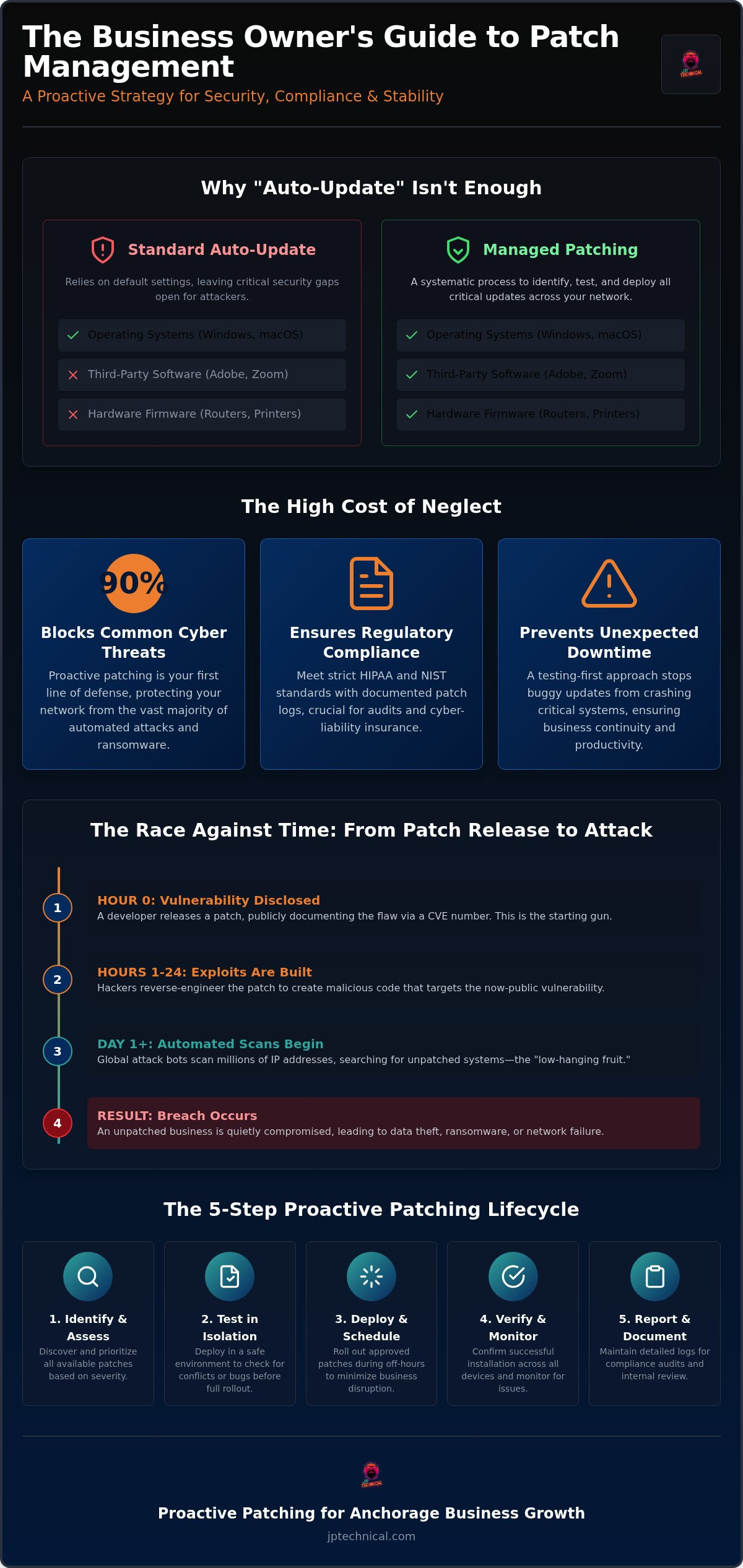
Effective patch management for businesses covers your operating systems like Windows and macOS, but it also extends to third-party applications like Chrome, Zoom, and Adobe. It even includes the hardware firmware in your routers and printers. Default “Auto-Update” settings rarely cover these external programs or hardware components. If a security hole exists in a PDF reader you haven’t opened in months, a standard Windows Update won’t fix it. This leaves a back door wide open for intruders to enter your network quietly.
The Vulnerability Gap: How Attackers Exploit Delays
When a developer releases a patch, they essentially publish a roadmap for hackers. Every patch is linked to a CVE (Common Vulnerabilities and Exposures) number, which publicly documents the flaw. Attackers use these numbers to build exploits, often within hours of the patch’s release. It’s a high-stakes race against time. If your systems sit unpatched for days or weeks, you become “low-hanging fruit” for automated ransomware scripts. For local firms in Anchorage or Fairbanks, these delays don’t just risk data; they can lead to failing a HIPAA audit if patient information is left exposed through known vulnerabilities.
Patching vs. Updating: Understanding the Difference
It’s vital to distinguish between these two terms for the sake of your operational stability. Patching is a “need-to-have” operation focused strictly on security fixes and critical bug repairs. Updating is often a “nice-to-have” that brings new features or user interface changes. In a professional environment, we prioritize patching to ensure safety without the risk of an update introducing “feature bloat” that might break your specialized software. If a new update includes unnecessary cosmetic changes but no security fixes, it’s often safer to wait. We focus on keeping your network stable and predictable so you don’t arrive at the office to find your essential tools have been rearranged by an overnight update.
The High Cost of Neglect: Security, Compliance, and HIPAA
Neglecting your software updates isn’t just a technical oversight; it’s a significant financial gamble. A single unpatched vulnerability can result in weeks of downtime and catastrophic data loss. In 2026, the landscape for cyber-liability insurance has changed. Carriers no longer take your word for it. They now require verified proof of a proactive strategy for patch management for businesses before they’ll issue or renew a policy. If you can’t demonstrate that your systems are consistently maintained, you may find yourself without coverage precisely when a breach occurs.
HIPAA and the “Reasonable and Appropriate” Standard
For medical practices in Anchorage and Fairbanks, patch management is a core component of regulatory survival. The HIPAA Security Rule requires covered entities to implement “reasonable and appropriate” technical safeguards to protect patient information. During an audit, investigators look for detailed patch logs as evidence of your compliance. They want to see that you have a structured Enterprise Patch Management Planning strategy in place. Simply relying on default settings isn’t enough to satisfy these requirements. You need specialized HIPAA Compliant IT Services to document that every critical vulnerability was addressed within an acceptable timeframe.
The Threat to Alaska Small Businesses
Many local business owners believe their location or size makes them an unlikely target. However, global attack bots don’t care about your zip code. They scan IP ranges looking for any system that hasn’t been updated. Whether you manage a law firm in the Mat-Su Valley or a financial consultancy in Kenai, an unpatched server is an open invitation for ransomware. This neglect often leads to expensive data recovery efforts and a damaged reputation that’s hard to rebuild. To protect your livelihood, it’s helpful to integrate your updates into a broader plan for Managed Cybersecurity in Anchorage.
We understand that keeping up with these requirements can feel overwhelming while you’re trying to run a business. It’s our job to act as your seasoned guardian, handling the technical complexities so you don’t have to. If you’re concerned about hidden vulnerabilities in your current setup, a free IT assessment can provide the clarity you need to move forward with confidence.
The Patch Management Lifecycle: Why Testing Matters More Than Deployment
Many business owners view patching as a simple download and install task. In reality, a mature strategy for patch management for businesses follows a deliberate lifecycle. It begins with a comprehensive inventory of every device and application on your network. If you don’t know a legacy server is running in the back room, you can’t protect it. Once we have a clear map, we prioritize patches based on their risk level. We follow the NIST Guide to Enterprise Patch Management to distinguish between critical security fixes that need immediate attention and optional feature updates that can wait.
The most critical phase is testing. Before a single update touches your live environment, it should be vetted in a sandbox. This isolated space allows us to verify that the patch won’t conflict with your specific software or hardware configurations. Finally, we move to deployment and verification. We don’t just push the update; we confirm that it actually “stuck” across every workstation in the fleet. This final step is what separates professional patch management for businesses from simple automated updates.
The Dangers of “Blind Patching”
Blindly installing every available update is a recipe for operational chaos. We’ve seen cases where a standard Windows patch accidentally disabled specialized printer drivers or crashed custom accounting software. These disruptions can halt your entire workday. A professional approach includes a robust rollback plan, ensuring we can revert to a stable state if an update behaves unexpectedly. We also use a staged rollout strategy. By updating a small group of “canary” machines first, we can identify potential issues before they affect your entire team.
Reporting and Auditing Your Status
A successful patch cycle is one that is documented, not just completed. You need more than a hunch that your network is safe; you need a “Green Light” dashboard that provides real-time visibility into your security posture. These reports are vital for identifying “zombie” workstations. These are devices that appear connected but consistently fail to accept updates. Without this oversight, these machines remain silent vulnerabilities in your perimeter. We provide the clear, no-nonsense reporting you need to prove your network’s health to stakeholders or insurance providers. If you’re unsure where your network stands today, our free IT assessment can help identify any unpatched gaps in your current inventory.
Managed vs. Manual Patching: Choosing the Right Path for Your Business
Deciding between manual updates and professional services is really a question of how you value your time. Manual patching often seems like a cost-saving measure until a critical update triggers a loop of reboots and troubleshooting during your busiest hour. These hidden costs add up quickly. When you factor in the employee hours diverted from actual work to fix a “bad” update, the “free” option becomes quite expensive. Professional patch management for businesses utilizes Remote Monitoring and Management (RMM) tools to handle 90% of this workload automatically. This technology allows us to push updates across your entire fleet simultaneously from a central dashboard. This ensures updates happen after hours, keeping your team productive when it matters most and eliminating the frustration of mid-day interruptions.
When DIY Patching Becomes a Risk
Most organizations hit a tipping point once they grow beyond five workstations. At this scale, manual updates inevitably fall through the cracks. “Update Fatigue” is a real threat; staff members often click “Remind Me Later” until a vulnerability is weeks old. Shadow IT makes things even worse. When employees install their own software without IT oversight, it creates unmonitored gaps in your security perimeter. You can review IT pricing options to see how managed services provide a structured, safer alternative to this chaotic DIY approach.
The ROI of Managed Patching
Calculating the return on investment is a straightforward comparison. Consider the cost of just one hour of company-wide downtime. Between lost revenue and idle payroll, that single hour usually exceeds the monthly fee for a managed service. Fixing a vulnerability before it breaks your network is always more affordable than a reactive emergency call. This is why proactive patch management for businesses is a core part of a modern security strategy. Having a local guardian in Anchorage means you aren’t just buying a faceless software subscription from a distant vendor. You’re gaining a partner who understands the specific needs of Alaskan businesses and possesses the technical mastery to handle threats quietly in the background. We handle the background noise so you can focus entirely on your business growth. Schedule a Free IT Assessment
JP Technical: Proactive Patching for Anchorage Business Growth
JP Technical has spent 30 years serving as a seasoned guardian for organizations across the state. Our approach is simple: we are straight-shooters who value human connection over automated scripts. We understand that you need to focus on growth, not troubleshooting software glitches. By handling the technical noise in the background, we provide the stability your team needs to thrive. Our local expertise in Anchorage, Wasilla, Kenai, Palmer, and Fairbanks ensures that we aren’t just a voice on the phone. We are your neighbors who show up when things get difficult.
Effective patch management for businesses is only one piece of a larger security puzzle. To truly protect your livelihood, you need a partner who looks at the whole picture. We integrate our update strategies with EDR, backups, and comprehensive Managed IT Services in Anchorage. This layered defense ensures that if one line of protection is challenged, others are already standing ready. We believe in building long-term partnerships through steady reliability rather than high-pressure sales tactics.
Beyond Software: A Total Security Culture
Safety isn’t just about code; it’s about your entire environment. We often combine our digital oversight with Physical Security Solutions to protect your office from every angle. This total security culture includes training your team to recognize sophisticated threats. For example, we teach staff to identify when a popup “update” is actually a phishing attempt designed to steal credentials. Our promise is one of steady, reliable, and protective vigilance. We take the burden of security off your shoulders so you can focus on your professional goals.
Getting Started with a Security Audit
The first step toward a stable network is a thorough network assessment. During this initial audit, we identify every device on your network and uncover any hidden vulnerabilities that manual checks might miss. We don’t believe in one-size-fits-all solutions. Instead, we tailor our schedules for patch management for businesses to match your specific operational hours. If your practice is busiest on Monday mornings, we ensure updates happen during your off-hours to avoid any disruption. This methodical approach builds trust through consistent results. Secure your business today with a local partner who cares about your long-term stability.
Secure Your Business Future with Proactive Care
A secure network isn’t built on hope; it’s maintained through consistent, professional vigilance. We’ve explored why simple auto-updates fall short and how a structured lifecycle prevents the “blind patching” that leads to costly downtime. By shifting from reactive fixes to a managed approach, you protect your company from 90% of common cyber threats while remaining fully compliant with regulatory standards. Effective patch management for businesses is your best insurance against the evolving risks of 2026.
Since 1996, we’ve served as a seasoned guardian for organizations throughout Anchorage, Wasilla, Fairbanks, and Kenai. As specialists in HIPAA and regulatory compliance, we possess the technical mastery to handle the background noise of IT so you can focus on your work. You don’t have to navigate these technical hurdles alone. We’re your local partners, ready to show up when things get difficult. Request Your Free IT & Security Assessment Take the first step toward a more predictable and secure workplace today. We’re here to help you build a foundation for long-term growth and peace of mind.
Frequently Asked Questions
Is patch management the same as an antivirus?
No. Antivirus or EDR solutions detect and stop active threats trying to run on your system. Patching fixes the underlying security holes that allowed those threats to attempt entry in the first place. Think of a patch as fixing a broken lock on your door, while antivirus is the security guard watching for intruders. Both are essential components of a layered defense for your Anchorage office.
How often should a business run patch updates?
You should check for critical updates daily and deploy them based on their risk level. While “Patch Tuesday” is a common industry rhythm, high-severity vulnerabilities require immediate attention. A managed approach to patch management for businesses ensures that your systems are scanned continuously. This proactive schedule prevents a backlog of updates from accumulating and causing a massive system slowdown during your peak hours in Wasilla or Fairbanks.
Will patching my systems cause downtime during business hours?
Not if it’s handled correctly. We schedule updates and necessary reboots for your off-hours to ensure your team stays productive. By using Remote Monitoring and Management tools, we can stage deployments overnight or on weekends. This methodical timing eliminates the frustration of “Update and Restart” prompts appearing in the middle of a client meeting or a busy clinical shift in Kenai or Palmer.
What happens if a patch breaks my software?
We use a testing-first approach to identify potential conflicts before they reach your live environment. If a patch causes an unexpected issue with your custom software, we implement a rollback plan to restore your system to its previous stable state immediately. Having a local team means we can troubleshoot the root cause and find a workaround, ensuring your business operations don’t skip a beat when an update behaves unexpectedly.
Do I need to patch my mobile devices and tablets too?
Yes. Any device that accesses your network or handles professional data is a potential entry point for attackers. Mobile operating systems and applications require regular security updates to defend against the latest exploits. We include these devices in our comprehensive oversight to ensure your entire perimeter remains secure. This is especially vital for healthcare providers in Alaska who use tablets for mobile charting and HIPAA-protected communication.
Is patch management required for HIPAA compliance in Alaska?
Yes, it’s a mandatory technical safeguard under the HIPAA Security Rule. Federal regulators expect you to have a documented process for identifying and mitigating known software vulnerabilities. If you’re audited, you’ll need to provide patch logs as proof of your proactive maintenance. Relying on manual updates often fails this requirement because it lacks the consistent reporting needed to satisfy auditors during a review of your Anchorage practice.
Can I just use Windows Server Update Services (WSUS) for free?
You can, but it’s often more work than it’s worth for a small team. WSUS only handles Microsoft products, leaving your third-party apps like Chrome, Adobe, and Zoom completely exposed. It also requires an internal server and a dedicated person to manage the approvals and troubleshooting. Most local businesses find that a managed service is more cost-effective because it provides total coverage without the heavy administrative burden.
What is a “Zero-Day” vulnerability and how does patching help?
A Zero-Day is a security flaw that’s discovered by attackers before the software developer has a fix ready. Once a patch is released, it’s a race to install it before automated bots exploit the hole. Proactive patch management for businesses shortens this vulnerability gap significantly. By deploying these critical fixes within hours of release, we ensure your network isn’t left open to the most dangerous and modern threats.
 Article by
Colter Hobbs