Disaster Recovery for Medical Practices: 2026 Guide
Did you know that unplanned downtime for a small business in Anchorage can cost as much as $427 per minute in 2026? For a healthcare provider, those costs aren’t just financial; they represent a total halt in patient care and potential HIPAA violations. Most practices believe they’re protected because they have a backup drive, but true disaster recovery for medical practices requires a much deeper level of preparation. It’s the difference between having a copy of your files and actually being able to use them during a local crisis.
You already know the anxiety of wondering if your systems would hold up during a severe Alaska storm or a targeted cyberattack. It’s a heavy burden to carry when you just want to focus on your patients. This 2026 guide provides a clear roadmap to protect your data and keep your practice running. We’ll explain the difference between backups and recovery, outline the latest compliance updates for substance use disorder records, and show you how to build a plan that offers true peace of mind. You’ll finish this article with the tools needed to ensure your clinic never stops providing care.
Key Takeaways
Understand the critical difference between simple data backups and a full HIPAA-compliant contingency plan to avoid heavy fines and legal risks.
Learn how to set realistic Recovery Time Objectives (RTO) and Recovery Point Objectives (RPO) to ensure your clinic stays functional during an IT failure.
Discover how to protect your physical hardware and digital assets from Alaska’s unique environmental challenges, such as earthquakes and power grid instability.
Implement a reliable strategy for disaster recovery for medical practices that includes an Emergency Mode Operation Plan (EMOP) and manual downtime kits.
Explore the benefits of a local managed IT partnership to provide proactive 24/7 monitoring and technical support when your practice needs it most.
Table of Contents
Understanding HIPAA Contingency Requirements & Patient Data Risks
Defining Recovery Targets: RTO and RPO for Clinical Continuity
Implementing a Managed Disaster Recovery Solution in Anchorage
Understanding HIPAA Contingency Requirements & Patient Data Risks
The HIPAA Security Rule doesn’t treat digital safety as an option. It mandates that every covered entity establish a formal contingency plan to protect patient information. If your practice handles Electronic Protected Health Information (ePHI), you must have a clear strategy for technical failures. A HIPAA Disaster Recovery Plan is a documented process for restoring data and operations after a disruption. Without this document, your practice remains vulnerable to both technical collapse and federal scrutiny.
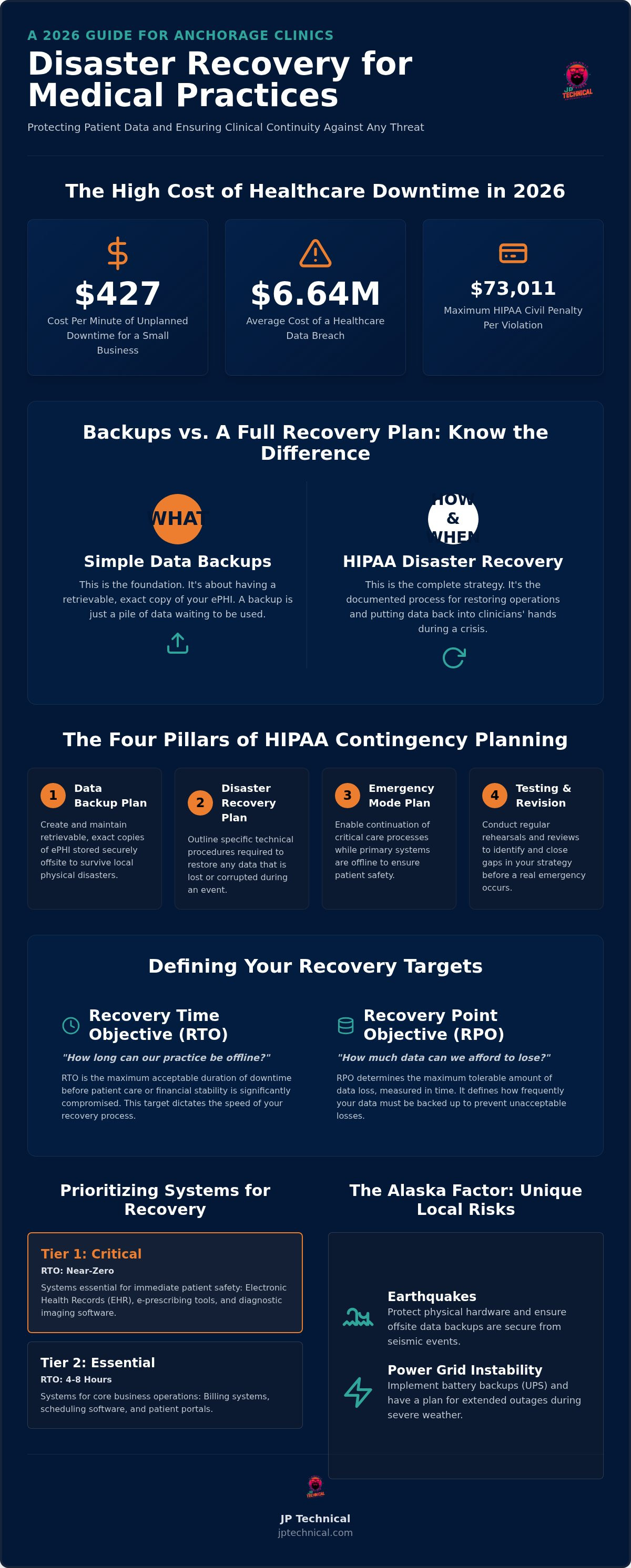
Many providers mistake simple data backups for a complete solution. While backups are the foundation, they only represent the “what” of your protection strategy. True disaster recovery for medical practices focuses on the “how” and “when.” It involves mastering broader IT disaster recovery concepts to ensure that systems don’t just exist, but actually function when you need them most. If a server fails, a backup is just a pile of data; a recovery plan is the engine that puts that data back into your clinicians’ hands.
The Four Pillars of HIPAA Contingency Planning
Data Backup Plan: You must create and maintain retrievable, exact copies of ePHI. This data should be stored securely offsite to survive local physical disasters.
Disaster Recovery Plan: This pillar outlines the specific technical procedures required to restore any data that is lost or corrupted during an event.
Emergency Mode Operation Plan: Your clinic needs a way to continue critical care while primary systems are offline. This ensures patient safety isn’t compromised by a digital outage.
Testing and Revision: A plan is only theoretical until it’s tested. Regular rehearsals identify gaps in your strategy before a real emergency occurs.
The High Cost of Healthcare Downtime in 2026
The consequences of ePHI loss are devastating. In 2026, the average cost of a healthcare data breach has reached $6.64 million. Beyond the financial hit, restricted access to Electronic Health Records (EHR) directly threatens patient safety. Clinicians cannot check allergies, verify dosages, or view medical histories, which creates immediate legal liabilities. Federal fines also add significant pressure; in 2026, HIPAA civil penalties range from $145 to $73,011 per violation. To avoid these risks, many local providers rely on HIPAA Compliant IT Services in Anchorage to maintain their regulatory standing and operational continuity.
Defining Recovery Targets: RTO and RPO for Clinical Continuity
Effective disaster recovery for medical practices starts with setting clear, measurable goals. Without these targets, you’re merely guessing when your clinic might be back in business after a failure. Technical teams use two primary metrics to build these plans: Recovery Time Objective (RTO) and Recovery Point Objective (RPO). RTO is about time, while RPO is about data freshness. Understanding how these apply to your specific workflow is the first step toward clinical stability.
RTO is the maximum duration your practice can stay offline before patient care or financial stability is compromised. For a busy clinic, this might be two hours; for others, it could be a full day. RPO, on the other hand, determines the maximum amount of data loss you can tolerate. If your system crashes at 3:00 PM and your last backup was at 8:00 AM, you’ve lost seven hours of patient notes. Balancing the cost of these targets is a strategic decision. Faster recovery times and more frequent backups require more robust infrastructure, which increases your investment. Finding the right balance ensures you don’t overspend on non-essential systems while keeping critical care active. If you aren’t sure where your current setup stands, a free IT assessment can help identify your actual recovery capabilities.
Prioritizing Your Systems for Recovery
Not every application in your office needs to be restored at the same speed. We recommend a tiered approach to prioritize your resources during a crisis:
Tier 1 (Critical): Electronic Health Records (EHR), e-prescribing tools, and diagnostic imaging software. These require near-zero RTO to ensure patient safety.
Tier 2 (Essential): Billing systems, scheduling software, and patient portals. These can often wait 4 to 8 hours without causing a total operational collapse.
Tier 3 (Administrative): General office files, payroll systems, and non-essential software. These are typically restored last, often with an RTO of 24 hours or more.
The Role of 3-2-1 Backups in Modern Medicine
The 3-2-1 backup strategy is the gold standard for data protection. It requires keeping three copies of your data, stored on two different media types, with one copy kept off-site. Local backups on a physical drive are excellent for quick restores after a minor server glitch, but they won’t help if a fire or earthquake damages your entire building. Integrating cloud-based disaster recovery allows for near-instant failover. This means if your local server dies, your IT partner can “spin up” a virtual version of your environment in the cloud, allowing your staff to keep working while the physical hardware is repaired.
The Alaska Factor: Disaster Challenges Unique to Our Region
Most guides for disaster recovery for medical practices are written for the Lower 48. They assume stable power grids, easy road access, and fiber optic connectivity at every corner. In Alaska, we know the reality is different. Our state averages four federal disaster declarations every year, ranging from severe storms to seismic events that can physically shift your server racks. Protecting your patient data requires a plan that accounts for the specific environmental and logistical hurdles of the North.
Seismic activity is a constant reality here. If your physical hardware isn’t properly secured and braced, a significant tremor can cause more damage than any cyberattack. Beyond earthquakes, our power grid faces unique pressures from extreme weather and remote geography. A standard consumer-grade battery backup won’t suffice for a clinical environment. You need robust Uninterruptible Power Supply (UPS) systems and redundant backup generators to keep critical EHR systems alive during a prolonged outage. In areas like Kenai or Fairbanks, connectivity remains a significant hurdle. While newer satellite options like Starlink have reduced latency to 25-50ms, traditional satellite connections still struggle with 600ms delays. A reliable plan must include redundant internet paths to ensure your clinic stays reachable.
Integrating Physical Security into Disaster Recovery
Digital protection and physical safety are two sides of the same coin. During a facility emergency, your access control systems must function correctly to secure sensitive areas while allowing emergency personnel to enter. If your building is inaccessible due to a local disaster, high-definition security cameras allow you to monitor the status of your facility remotely. This visibility is vital for verifying the safety of your hardware and physical files before you send staff back into the building. Integrating Physical Security & Surveillance Services into your broader strategy ensures that your practice is protected from every angle.
Local Accountability: The JP Technical Advantage
When the ground shakes or the power fails in Anchorage, a “big box” cloud provider in Virginia isn’t going to help you. They can’t see the local conditions, and they certainly can’t drive to your office to swap out a failed component. Having a local partner who understands the geography of the Mat-Su Valley and the Interior is a strategic necessity. We focus on proactive server maintenance to identify and resolve hardware vulnerabilities before they lead to a total system collapse. This neighborly vigilance provides a level of safety that distant vendors simply cannot match. If your practice faces a major IT failure, you need a guardian who can physically show up and handle the technical heavy lifting.
Building an Emergency Mode Operation Plan (EMOP)
An Emergency Mode Operation Plan (EMOP) is the bridge between a technical failure and continued clinical care. While your IT systems are being restored, your practice must still function. This plan isn’t just a document for a binder; it’s a living survival guide for your staff. Effective disaster recovery for medical practices requires a clear chain of command. You must designate a specific individual, typically the practice manager or lead physician, who has the authority to declare a disaster and trigger emergency protocols. This prevents hesitation and ensures everyone knows exactly when to pivot to manual workflows.
Communication protocols are equally vital. You need pre-written templates for notifying patients of delays, alerting vendors of system status, and informing regulatory bodies if ePHI access is compromised. These protocols should include secondary contact methods, such as staff personal cell numbers or physical meeting points, in case local phone lines or internet services are down. Every exam room should also be equipped with a “Downtime Kit.” These kits contain the physical tools needed to continue care without a computer, including paper intake forms, encounter notes, and manual prescription pads. Having these resources ready allows your clinicians to stay focused on the patient rather than the technology gap. Schedule a free IT assessment to evaluate your practice's emergency readiness
Step-by-Step: Creating Your Practice’s EMOP
Building your plan starts with identifying the clinical functions that cannot stop. Triage, urgent prescriptions, and life-saving diagnostics must remain active regardless of your digital status. Once these are identified, assign specific roles to your team. The IT Lead handles the recovery of servers, the Clinical Lead manages patient flow, and the Communications Lead manages external messaging. Document the manual workflows for charting and prescribing clearly so that even new staff can follow them. Finally, don’t forget the “failback” process. You must have a documented strategy for how you’ll enter paper notes back into the EHR once your systems are online to maintain a complete medical record.
Testing Your Plan Without Disrupting Care
A plan that hasn’t been tested is merely a suggestion. We recommend quarterly tabletop exercises where your team walks through hypothetical scenarios, such as a ransomware attack on a Tuesday morning or a local earthquake. These simulations reveal gaps in your communication or manual workflows before a real crisis occurs. Your IT partner should also conduct sandboxed restore tests. These tests verify the integrity of your data by restoring it in an isolated environment, ensuring that your backups are actually functional without touching your live patient records. Use the results of these tests and feedback from your staff to update your EMOP regularly. Continuous improvement is the only way to maintain true clinical vigilance.
Implementing a Managed Disaster Recovery Solution in Anchorage
Building an in-house team to manage disaster recovery for medical practices is a significant financial commitment. In Anchorage, an IT manager’s salary often ranges from $95,000 to $140,000 per year, and that doesn’t include the cost of specialized recovery hardware or cloud storage. Managed IT services provide a more predictable, cost-effective alternative by providing enterprise-level tools and expertise through a subscription model. This approach allows you to maintain clinical continuity without the overhead and management burden of a full-time internal department.
We focus on proactive patch management and 24/7 monitoring to close security gaps before they are exploited. If a vulnerability is discovered in your EHR or operating system, it’s addressed immediately to prevent system-wide failures. This level of vigilance reduces the likelihood of a cyberattack necessitating a full recovery event. Automated, HIPAA-compliant backups run quietly in the background, ensuring your patient data is always fresh and retrievable. Transitioning from a “broken IT” model to a resilient practice means you no longer wait for a crash to take action; you have a partner who prevents the crash from happening.
What to Look for in a Healthcare IT Partner
A healthcare-focused partner must understand more than just servers. They need deep expertise in medical software like EHRs and a thorough grasp of HIPAA Compliance Services. It’s vital to choose a team with a proven track record in Alaska, specifically in Anchorage and surrounding areas like Wasilla, Kenai, or Fairbanks. A comprehensive partner also integrates physical security, such as security cameras and access controls, with your digital recovery plan. This holistic approach ensures your facility and your data are protected by a single, accountable local guardian.
Starting Your Resilience Journey
Your path to resilience starts with a baseline assessment. This process identifies current security gaps and evaluates your existing hardware for seismic or power-related risks. JP Technical handles the technical heavy lifting of disaster recovery planning, from configuring redundant connections to drafting your emergency protocols. We act as your dedicated ally, ensuring your practice remains stable and compliant while you focus on patient care. Moving toward a more secure future doesn’t have to be overwhelming when you have a specialist handling the details. Schedule your free IT assessment today to protect your practice.
Protecting Your Practice and Your Patients Beyond 2026
You’ve worked hard to build a medical practice that serves your community. Protecting that legacy requires more than just simple digital backups; it demands a comprehensive strategy that accounts for HIPAA regulations and Alaska’s unique environmental risks. By defining clear recovery targets and implementing a practical Emergency Mode Operation Plan, you ensure that your clinic remains a stable place of care even when the unexpected happens. Investing in disaster recovery for medical practices is ultimately an investment in patient safety and clinical continuity.
True security comes from a partnership with a local guardian who understands both digital and physical threats. JP Technical has served as HIPAA-compliant experts since 1996. Being locally owned and operated in Anchorage, we’ve seen the challenges our region faces firsthand. We provide integrated physical and digital security solutions that offer the peace of mind you need to focus on what matters most. Your patients deserve a practice that never stops caring for them. Get a Free IT Assessment for Your Medical Practice Taking the first step toward resilience is a commitment to your staff, your patients, and your future. We’re ready to help you navigate these technical hurdles with confidence and reliability.
Frequently Asked Questions
Is a cloud backup enough for HIPAA disaster recovery compliance?
Cloud backup is only one part of a compliant strategy. HIPAA requires a formal contingency plan that includes a data backup plan, a disaster recovery plan, and an emergency mode operation plan. If you only have backups, you lack the procedures to restore operations or continue patient care during an outage. A complete solution for disaster recovery for medical practices ensures that data is retrievable and usable when primary systems fail.
What is the difference between a Business Continuity Plan and a Disaster Recovery Plan?
Disaster recovery focuses specifically on the technical aspects of restoring IT infrastructure and data after a failure. Business continuity is broader, covering how your entire clinic continues to operate during a disruption. While your IT partner works on disaster recovery for medical practices to get servers back online, your business continuity plan ensures staff know how to handle patient appointments using manual workflows. Both are necessary for total operational resilience.
How often should our medical practice test our disaster recovery plan?
You should test your plan at least once a year to meet basic compliance standards. However, we recommend quarterly tabletop exercises or sandboxed restore tests for medical clinics in Alaska. Frequent testing accounts for staff turnover and changes in your technical environment. Regular rehearsals ensure that your team remains calm and efficient during actual emergencies, such as local power grid failures or seismic events that disrupt your Anchorage facility.
What are RTO and RPO, and why do they matter for my clinic?
Recovery Time Objective (RTO) measures how long your clinic can stay offline before patient care is compromised. Recovery Point Objective (RPO) defines how much data loss is acceptable, usually measured by the time since your last backup. These metrics matter because they dictate the technical architecture of your recovery solution. Setting these targets helps you balance your infrastructure investment with the clinical need for near-instant access to patient records.
Does HIPAA require my disaster recovery backups to be encrypted?
HIPAA considers encryption an addressable standard, but in 2026, it is effectively a requirement for protecting ePHI. You must encrypt data both at rest and during transmission to prevent unauthorized access during a disaster. If your backups are lost or stolen during a physical relocation after a flood or fire, encryption is your primary defense against a massive data breach. We ensure all recovery data meets these strict federal security standards automatically.
What happens if our EHR provider goes down but our local network is fine?
If a cloud-based EHR provider suffers an outage, your local network may still be functional, but your clinical data remains inaccessible. In this scenario, you must pivot to your Emergency Mode Operation Plan. This involves using the downtime kits mentioned earlier to continue charting and prescribing manually. Your disaster recovery plan should include specific communication protocols to receive updates from the EHR vendor while maintaining patient flow in your office during the disruption.
Can JP Technical help with both digital IT recovery and physical security?
We specialize in integrating digital IT recovery with physical security solutions. As a local Anchorage partner, we provide managed IT services alongside physical access controls and professional security camera systems. This dual approach ensures that if a physical event damages your office, we can monitor the facility status remotely while simultaneously restoring your digital environment. We have provided these HIPAA-compliant solutions to Alaska businesses since our founding in 1996.
How much does a disaster recovery plan typically cost for a small practice?
Costs depend on your specific recovery targets and the volume of data you protect. Managed disaster recovery is generally more affordable than maintaining an in-house IT department, which can cost over $100,000 annually in the Anchorage market. Most practices find that a subscription-based model provides predictable monthly expenses while delivering high-level protection. We focus on right-sizing your solution to ensure you don’t overpay for non-essential systems while keeping critical care protected.
 Article by
Colter Hobbs