Anchorage Business Cloud: 2026 Strategy for Local Growth
By the end of 2026, 95% of new digital workloads will be built on cloud-native platforms. For an Alaska business owner, that statistic often feels like it was written for someone with a direct fiber line to Silicon Valley. You likely agree that the cloud offers immense potential for growth, yet searching for business cloud services Anchorage providers often reveals solutions that don’t account for high latency in rural areas or the constant threat of HIPAA non-compliance. It’s difficult to justify moving your operations when you can’t predict your monthly IT spending or guarantee that a remote team in Wasilla will stay connected during a winter storm.
This guide shows you how to leverage secure, scalable cloud solutions built for our unique infrastructure and regulatory environment. You’ll discover how to stabilize your IT costs, secure your data against evolving ransomware threats, and ensure your team stays productive no matter where they’re working in the Last Frontier. We’ll provide a clear strategy for managing your 2026 technical requirements with confidence and local accountability.
Key Takeaways
Local cloud management eliminates the frustration of distant support and addresses Alaska’s unique latency issues through proximity and local accountability.
Implementing business cloud services Anchorage companies can trust requires balancing scalable internet-based tools with local physical security and proactive maintenance.
Modern cloud environments offer superior protection compared to traditional on-premise servers, especially for medical and dental practices requiring strict HIPAA compliance.
A successful transition to the cloud follows a structured five-step roadmap that prioritizes inventory accuracy and strategy design over generic “lift and shift” methods.
Managed solutions provide predictable IT costs and a proactive approach that identifies technical risks before they disrupt your daily operations.
Table of Contents
What are Business Cloud Services in Anchorage?
Understanding what cloud computing is starts with looking past the technical jargon. At its core, it involves moving your computing power, file storage, and software off local machines and onto scalable servers accessed via the internet. For local owners, business cloud services Anchorage provides a way to ditch the “closet server” that hums in the corner and risks overheating during a power surge. It’s a fundamental shift from buying expensive hardware every few years (CapEx) to a predictable monthly subscription (OpEx) that helps your cash flow stay steady.
Anchorage businesses face a unique “Alaska Factor” regarding speed. If your cloud provider hosts your data in Virginia or Ireland, you’ll feel every millisecond of that distance through lag and slow loading screens. Proximity matters. Working with a provider that understands our local fiber infrastructure ensures your data travels the shortest path possible. By 2026, staying competitive means moving away from aging on-premise hardware. Local companies adopting these automated workflows have already seen operational cost cuts of 8-12% according to 2026 industry reports.
Common Cloud Models for Local Offices
Public cloud options, such as Microsoft Azure or AWS, offer massive scalability for general business needs like email and file sharing. If your business has high-security requirements or runs custom software, a private cloud provides dedicated resources built specifically for your team. Many local firms choose a hybrid cloud model. This approach keeps sensitive data on a secure, local infrastructure while using the public cloud for daily collaboration. It offers the best balance of speed and protection.
The Role of a Managed Service Provider (MSP)
Moving to the cloud isn’t a “set it and forget it” task. Without active monitoring, monthly costs can spiral and security patches can lapse. This is where the difference between a cloud vendor and a cloud partner becomes clear. A vendor sells you a license and disappears. A partner, like JP Technical, acts as a local guardian. We provide constant monitoring to stop threats before they reach your network. You can review our service plans to see how we structure these protective layers to keep your IT spending predictable and your data secure.
The Local Advantage: Why Anchorage Businesses Choose Local Management
When your team can’t access a critical file, calling a 1-800 number in a different time zone is a recipe for lost productivity. Distant cloud vendors often lack the context of your specific office in Wasilla or the Kenai Peninsula. If a local fiber line is cut during construction or a winter storm knocks out power, a help desk in another state can’t troubleshoot the physical hardware on your desk. Choosing business cloud services Anchorage experts can trust ensures that your support team understands the local infrastructure that keeps your doors open.
Local management bridges the gap between the digital cloud and your actual office floor. We understand the Alaska business culture and the specific regulatory hurdles we face here. For example, we ensure your setup aligns with NIST security and privacy guidelines while also meeting the requirements of the 2026 Alaska Insurance Data Security Law. It’s about having a partner who speaks plainly and acts quickly. If you’re unsure if your current setup meets these standards, you can request a free IT assessment to identify any hidden risks.
Connectivity and Latency in the 49th State
Latency is the enemy of efficiency. In Alaska, connectivity isn’t always a given. Local nodes improve performance for industries that move large files, such as medical imaging or engineering firms. Our sub-Arctic weather puts immense stress on physical infrastructure, which makes cloud redundancy vital. If one path fails, your data needs an immediate, local alternative to keep your staff working. Local peering reduces “hops” between your office and the data node, which significantly speeds up data access for Anchorage offices.
Accountability and the Neighborly Approach
There is immense value in working with a “straight-shooter” local expert who knows your office layout and your team. You aren’t just a ticket number in a system; you’re a neighbor. Because we understand the physical reality of local businesses, we can integrate your digital data protection with physical security and surveillance to create a complete safety net. We show up when things get difficult, providing a level of local accountability that national vendors simply cannot match. This proactive care keeps your operations steady and your mind at ease.
Security and HIPAA Compliance in the Alaska Cloud
Many Anchorage business owners still trust the server in their office closet because they can see it. In 2026, that physical visibility is a false sense of security. Local hardware is vulnerable to power surges, hardware failure, and physical theft. Cloud-native environments offer layers of protection that are nearly impossible to replicate locally on a modest budget. These advanced tools allow smaller Anchorage firms to compete with larger companies by providing enterprise-level defenses against the rising threat of automated ransomware attacks.
Protecting your data requires more than just a strong password. We implement Endpoint Detection and Response (EDR) to monitor every device connected to your network in real time. If a staff member’s laptop in Wasilla is compromised, the system identifies the threat and isolates the device instantly. This strategy follows a “Zero Trust” model. We verify every access request, whether it comes from your main office or a remote site. It’s a proactive way to manage business cloud services Anchorage teams rely on for daily operations.
HIPAA-Compliant Cloud Architecture
Medical and dental practices in Alaska face strict regulatory oversight that distant vendors often overlook. A Business Associate Agreement (BAA) is a non-negotiable requirement for any cloud partnership. We manage these complex relationships to ensure all patient records remain encrypted both at rest and in transit. This protective vigilance keeps your practice compliant with federal law and the 2026 Alaska Insurance Data Security Law. Explore our HIPAA Compliant IT Services to see how we secure your sensitive data.
Disaster Recovery and Business Continuity
A cloud backup is only one piece of the safety net. You need a comprehensive recovery plan to stay operational after a local disaster, such as a major earthquake or a prolonged power grid failure. While backups save your files, business continuity ensures your team can actually access those files to serve customers during a crisis. If your backup isn’t tested and ready for a rapid restore, your business remains at risk. For a deeper look at staying resilient, read our guide on Managed IT Services in Anchorage: The 2026 Guide to Business Continuity.
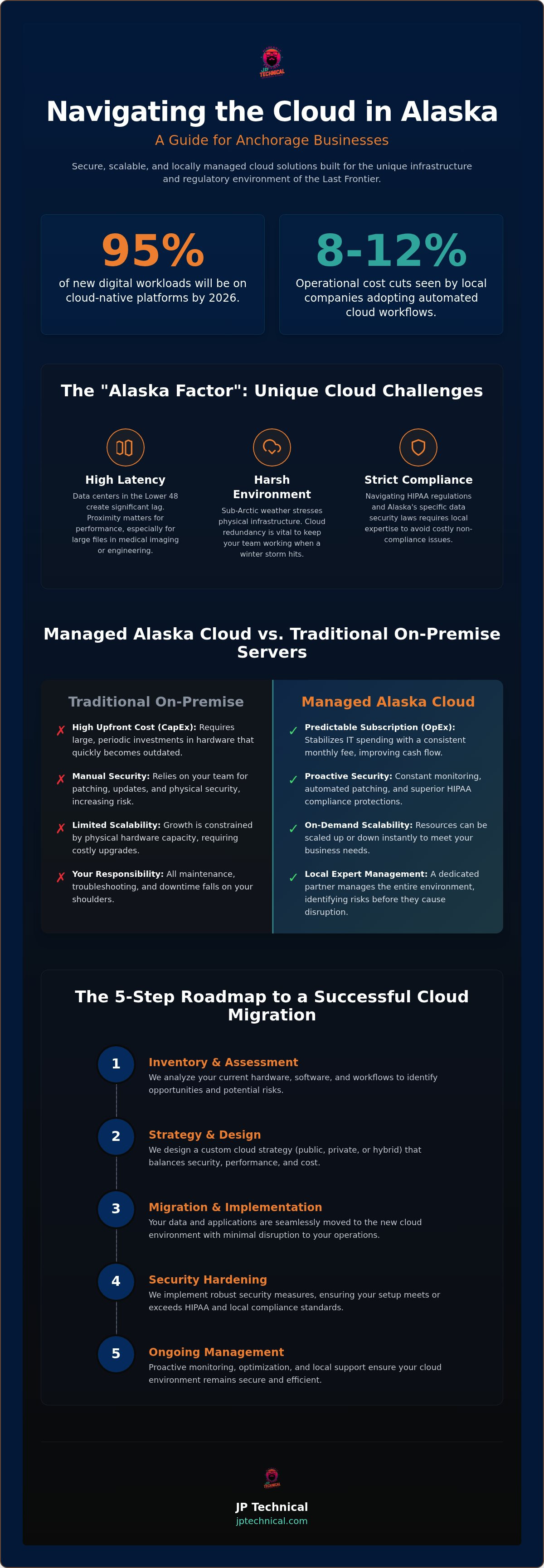
The 5-Step Roadmap to a Successful Cloud Migration
Migrating your operations isn’t a single event; it’s a series of calculated moves designed to protect your data and your productivity. Many owners worry about the transition being disruptive. However, following a methodical roadmap ensures that business cloud services Anchorage providers deliver a seamless experience rather than a technical headache. We don’t just flip a switch; we build a foundation that supports your growth.
Step 1: Readiness Assessment. We begin by inventorying your current hardware and software. It’s vital to identify what works and what’s nearing the end of its life so you don’t migrate outdated problems into a new environment.
Step 2: Strategy Design. We help you decide between a “Lift and Shift” approach for speed or a “Cloud-Native” transformation. This decision depends on your specific software needs and how much scalability your team requires.
Step 3: Security Hardening. Before moving a single file, we set up robust firewalls and access controls. This proactive step ensures your data remains protected from the moment it leaves your local office.
Step 4: The Pilot Phase. We test the environment with a small group of users. This allows us to verify there is zero lag and that all local connectivity is stable before the full launch.
Step 5: Full Migration & Training. Once the pilot is successful, we move your data and empower your Anchorage staff with the training they need to work confidently in the new system.
Avoiding Common Migration Pitfalls
A major risk during migration is “Shadow IT,” which happens when employees use unmanaged cloud apps for convenience. These unauthorized tools create massive security gaps. Additionally, Alaska’s unique internet landscape means bandwidth throttling can kill a migration if it’s not managed correctly. We schedule data transfers to avoid peak times, ensuring your daily business stays fast. We also specialize in the “messy middle,” making sure your legacy software still works perfectly in a modern cloud environment. If you’re ready to see how these steps apply to your office, get your free IT assessment today.
Post-Migration Optimization
Success doesn’t end when the data move is finished. We take a “Vigilant Guardian” approach to continuous monitoring, catching small issues before they become downtime. Our team handles managed software updates while your staff sleeps, ensuring you’re always running the most secure versions of your tools. This level of proactive care is included in our steady, predictable service models. You can view our Managed IT Pricing to find a plan that fits your 2026 growth strategy.
Managed Cloud Solutions with JP Technical
JP Technical provides a level of local accountability that national providers cannot match. We’ve served the community since 1996, tailoring the business cloud services Anchorage companies use to navigate our unique environment. Our approach centers on proactive care. Instead of waiting for a system to fail, we actively monitor your network to stop threats before they reach your data. This vigilance extends to a 360-degree defense. We integrate your digital cloud security with physical security and surveillance to protect your office from every angle. You get a single, reliable point of contact who knows your office layout and your team by name.
We prioritize human connection over automated help desks. If you have a question, you talk to a local specialist who understands that a connectivity issue in Kenai is different from one in downtown Anchorage. Our team manages the business cloud services Anchorage offices rely on to stay productive during our toughest winters. This neighborly approach ensures you never feel like a ticket number in a distant queue. We’re here to lower your anxiety regarding technical hurdles through steady, reliable partnership.
Customized Cloud for Every Alaska Industry
Every industry faces different technical and regulatory hurdles. We build specific solutions for healthcare practices needing HIPAA-compliant infrastructure, legal firms requiring ironclad document security, and construction companies managing remote sites. As your business grows from Anchorage to Fairbanks, your IT should scale without friction. For a deeper look at protecting your specific sector, see our Managed Cybersecurity in Anchorage: A 2026 Guide for Local Business Defense. We ensure your technology supports your growth rather than hindering it.
Getting Started with a Free Assessment
The first step toward a stable IT future is a thorough audit. During your JP Technical IT assessment, we examine your current hardware, software, and security protocols to find hidden vulnerabilities. We pride ourselves on being straight-shooters. If the cloud isn’t the right move for your business yet, we’ll tell you exactly why. We value honesty over a quick sale because we’re looking for long-term partnerships. You’ll receive a clear, functional report on where you stand and how to reach your 2026 goals. Schedule your Free IT Assessment today and take the guesswork out of your technology strategy.
Building a Resilient Foundation for 2026
The transition to the cloud is a strategic move to ensure your business remains competitive and secure. By prioritizing local proximity to reduce latency and following a methodical migration roadmap, you can eliminate the risks often associated with digital transformation. Whether you are managing sensitive patient records or coordinating a remote team, a proactive approach to security is no longer optional. It’s about creating a stable environment where your technology works quietly in the background.
JP Technical has been serving Alaska businesses since 1996. Our local, Anchorage-based support team acts as a vigilant guardian, combining technical mastery with a no-nonsense work ethic. As HIPAA-compliant security experts, we understand the specific regulatory hurdles you face every day. If you’re ready to optimize your business cloud services Anchorage strategy, we’re here to guide you with honesty and clarity.
Don’t leave your technical stability to chance. Secure your business future with a Free IT Assessment today. We look forward to helping you build a stable partnership that provides total peace of mind.
Frequently Asked Questions
Are cloud services secure enough for my Anchorage business?
Cloud environments provide superior security compared to traditional hardware, which is a major reason why 94% of companies globally are using cloud computing in 2026. We use layers of protection like Endpoint Detection and Response (EDR) and advanced identity management to keep your data safe. These systems monitor for threats quietly in the background, which is much more effective than a locked server room. It’s about proactive vigilance rather than just reactive patching.
How much do business cloud services cost in Alaska?
Costs for business cloud services Anchorage depend on your total user count and the specific technical resources your team requires. Instead of a large upfront capital expense for hardware, you move to a predictable monthly operational expense. This shift helps your cash flow stay steady and makes it easier to plan your annual budget. We provide clear pricing models that match your growth, ensuring you only pay for what you actually use.
Will moving to the cloud cause downtime for my office?
Professional migrations involve zero to minimal downtime when handled with a methodical strategy. We follow a 5-step roadmap that includes a pilot phase to test the environment before the full launch. By scheduling data transfers during off-peak hours and verifying connectivity first, we ensure your daily operations remain smooth. Your team can stay productive while we handle the technical transition quietly. This steady approach builds trust through a consistent and organized process.
Can I use cloud services if my internet in Wasilla is slow?
You can still leverage the cloud even with inconsistent internet through hybrid solutions that balance local speed with digital security. A hybrid model keeps critical, bandwidth-heavy data on a local device while syncing other files to the cloud. This approach ensures you have the speed you need for daily tasks while gaining the redundancy benefits of business cloud services Anchorage providers offer. It’s a practical way to manage technical hurdles in areas like Wasilla or Kenai.
What is the difference between cloud storage and cloud computing?
Cloud storage is primarily for saving and sharing files, while cloud computing allows you to run entire applications and processing tasks over the internet. Storage is like a digital filing cabinet; computing is like having a high-powered workstation in the cloud. Most local businesses benefit from a combination of both to ensure their software runs efficiently without relying on aging local machines. This distinction is vital for planning a scalable 2026 growth strategy that supports your team.
Do I still need a physical server if I move to the cloud?
Most businesses can completely eliminate their on-premise servers after a full migration to a cloud-native environment. However, some offices keep a small local device for specific legacy software or as a local backup node in a hybrid setup. We evaluate your current hardware during a thorough audit to determine if a “serverless” environment is the right choice for your needs. It’s about finding the most stable and cost-effective solution for your specific office layout and workflow.
Is JP Technical’s cloud solution HIPAA compliant?
Yes, our cloud infrastructure is designed specifically for regulated industries like healthcare and dental practices. We provide the necessary Business Associate Agreements (BAAs) and ensure data is encrypted both at rest and in transit. This protective care helps your practice meet federal requirements and the 2026 Alaska Insurance Data Security Law without the stress of managing complex technical hurdles yourself. We act as your local guardian to ensure your compliance remains bulletproof at all times.
How does cloud migration help with remote work for my team?
Moving to the cloud allows your team to access files and software securely from any location with an internet connection. Whether your staff is working from home in Anchorage or traveling across the state, they see the same files and use the same tools. This seamless access improves collaboration and ensures your business stays operational even when physical office access is limited by weather. It provides the peace of mind that your team stays connected.
 Article by
Colter Hobbs