Patch Management: 2026 Guide to Proactive Security
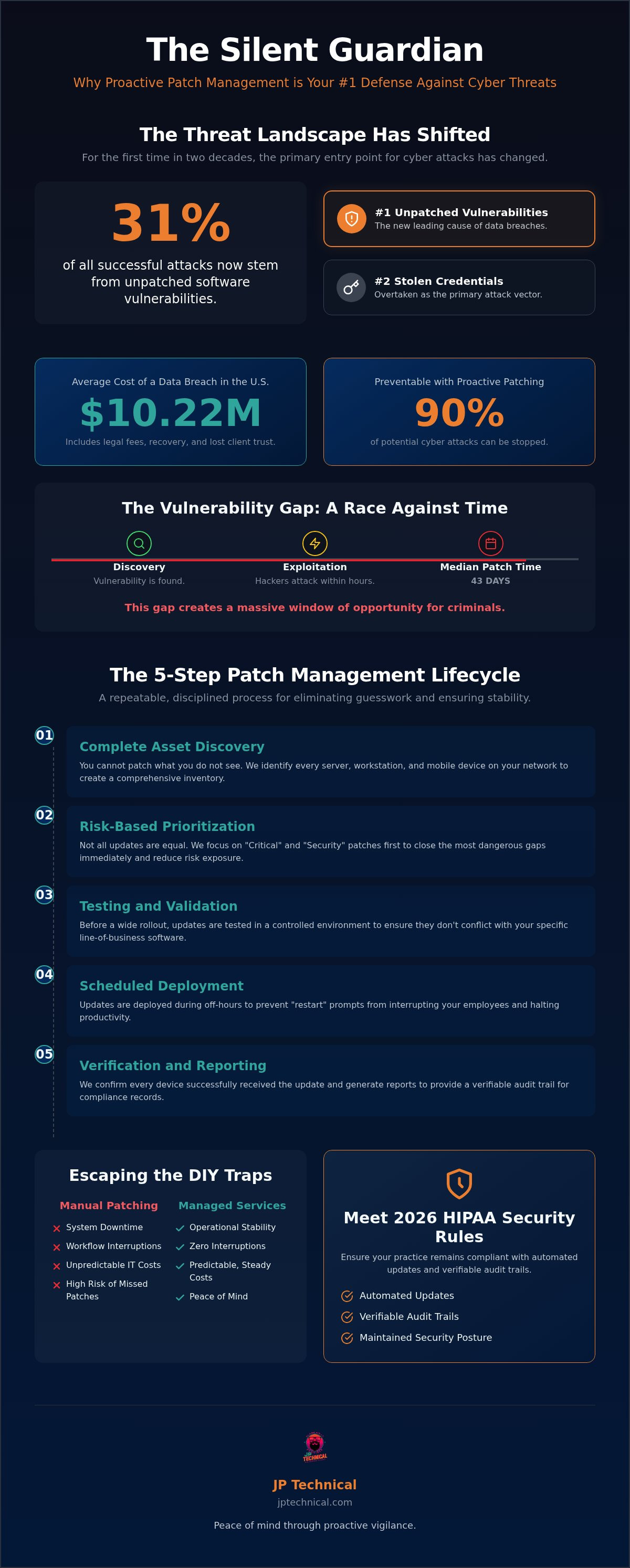
For the first time in nearly two decades, unpatched software vulnerabilities have overtaken stolen credentials as the primary cause of data breaches, accounting for 31% of all successful attacks. This shift reflects a growing anxiety for many business owners. You likely know the feeling of seeing a “restart to update” notification and hesitating because you don’t want to break a system that is currently working. It’s frustrating to feel like you’re choosing between operational stability and the risk of a zero-day exploit or ransomware attack.
You deserve a network that stays secure without interrupting your daily work. This guide explains how professional patch management for businesses can protect your company from 90% of cyber attacks while ensuring you meet the strict 2026 HIPAA Security Rule requirements. We’ll show you how to move away from reactive cycles and toward a predictable, automated system. You’ll learn how to manage updates across remote devices and maintain total compliance, all while keeping your IT costs steady and your office running smoothly. By the end of this article, you’ll have a clear roadmap for achieving peace of mind through proactive vigilance.
Key Takeaways
Understand why unpatched vulnerabilities are now the leading cause of data breaches and how a proactive strategy can stop 90% of potential attacks.
Master a 5-step lifecycle for patch management for businesses that focuses on asset discovery and risk-based prioritization to keep your network secure.
Navigate the 2026 HIPAA Security Rule updates to ensure your practice remains compliant through automated updates and verifiable audit trails.
Identify the “DIY” traps of manual patching that lead to system downtime; learn how managed services provide a more stable, predictable IT environment.
Gain peace of mind by shifting technical burdens to local experts who provide vigilant monitoring and on-site support when your systems need it most.
Table of Contents
Why Patch Management is the Silent Guardian of Your Business Security
Evaluating Your Strategy: Manual vs. Automated vs. Managed Patching
Compliance and Reliability: Meeting HIPAA and Industry Standards
Securing Your Future: The JP Technical Approach to Patch Management
Why Patch Management is the Silent Guardian of Your Business Security
Effective security doesn’t always involve flashy firewalls or complex passwords. Often, it’s the quiet, background work that keeps your company safe and stable. What is Patch Management? At its core, it’s the systematic process of identifying, testing, and installing code changes to fix vulnerabilities in your software. For local owners, professional patch management for businesses acts as a digital shield. It closes the doors that hackers use to slip into your network before they can cause damage.
Every time an employee clicks “Remind Me Later” on an update notification, they’re making a risky gamble. In 2026, vulnerability exploitation became the leading cause of data breaches, accounting for 31% of all initial access. Hackers don’t need to guess your passwords anymore. They simply wait for you to ignore a known flaw. This makes that snooze button the most dangerous tool in your office. When you delay a patch, you aren’t just postponing a technical chore; you’re inviting ransomware into your server room.
Think of patching as a business continuity necessity. It’s about more than just security. It’s about predictability. Unpatched software is often the root cause of “mysterious” system crashes and hardware conflicts that bring your workflow to a halt. By maintaining a disciplined schedule, you ensure your technology remains a reliable asset rather than a liability that could fail at any moment.
The Real-World Cost of Ignoring Critical Updates
A breach is a financial catastrophe. In the United States, the average cost of a data breach has climbed to a record $10.22 million. These costs include legal fees, recovery efforts, and the long-term loss of client trust. Beyond the threat of theft, unpatched systems lead to hardware instability and frequent software crashes that interrupt your daily operations. A Zero-Day Exploit is a cyber attack that targets a software flaw before the developer has a chance to create a fix, leaving your business completely exposed if you don’t have a rapid response plan in place.
Zero-Day Exploits: Why Speed is Your Only Defense
Speed is the only way to beat a modern hacker. Once a vulnerability is discovered, attackers can weaponize it within hours. Unfortunately, the median time for an organization to patch a known flaw has increased to 43 days. This gap creates a massive window of opportunity for criminals. In Alaska, we’ve seen a 17% increase in global cyber attacks this year, and local small businesses are often the primary targets. Manual checks can’t keep up with this pace. If your remediation time is measured in weeks instead of hours, your defense is already failing. Consistent patch management for businesses ensures your systems are updated automatically, providing the protective vigilance required to stay operational.
The 5-Step Patch Management Lifecycle for Modern Offices
A reliable security posture isn’t built on a single software update. It’s built on a repeatable, disciplined process. For patch management for businesses to be effective, it must follow a structured lifecycle that eliminates guesswork. This cycle allows you to address high-risk flaws while maintaining the stability of your daily operations. By moving through these five stages, you ensure that no device is left behind and no update causes an unexpected crash.
Step 1: Complete Asset Discovery. You cannot patch what you do not see. This involves identifying every server, workstation, and mobile device on your network.
Step 2: Risk-Based Prioritization. Not all updates are equal. We focus on “Critical” and “Security” patches first to close the most dangerous gaps immediately.
Step 3: Testing and Validation. Before a wide rollout, updates are tested in a controlled environment to ensure they don’t conflict with your specific software.
Step 4: Scheduled Deployment. Updates are pushed during off-hours to prevent “restart” prompts from interrupting your employees.
Step 5: Verification and Reporting. We confirm that every device successfully received the update and generate a report for compliance records.
Asset Discovery: Mapping Your Digital Perimeter
When you manage a fleet of laptops across Anchorage or remote workstations in Wasilla, keeping a manual tally of every software version is nearly impossible. Modern offices often struggle with “Shadow IT,” where personal devices or unapproved apps are used on the network. These unmanaged assets are prime targets for hackers. An accurate, automated inventory is the vital foundation of any cybersecurity audit, as it ensures your protective shield covers 100% of your digital footprint.
Testing and Deployment: Preventing the “Fix” from Breaking the System
The biggest fear for most business owners is that an update will “break” something. To prevent this, we use a “Sandbox” environment to test patches before they reach your live systems. This is especially critical for local businesses using legacy software that might be finicky with the latest Windows updates. Following the NIST Guide to Enterprise Patch Management, we prioritize stability alongside security. We use “silent” installs that run in the background, so your team stays productive while patch management for businesses keeps the network safe. If you’re concerned about your current update status, a free IT assessment can help identify where your process might be falling short.
Evaluating Your Strategy: Manual vs. Automated vs. Managed Patching
Deciding how to handle software updates is a fundamental business choice. While some small offices start with a “do-it-yourself” mindset, the 2026 threat landscape has made this approach increasingly dangerous. Professional patch management for businesses generally follows one of three paths: manual, automated, or managed. Each model offers a different level of protection and requires a different amount of your time. Understanding these differences is the first step toward achieving long-term operational stability.
The Hidden Risks of the Manual Approach
Manual patching is a recipe for burnout. It requires a dedicated person to physically or remotely check every single device for available updates. In most small offices, this task falls to an office manager or owner who is already stretched thin. This leads to “Patch Fatigue,” where critical notifications are ignored because there simply isn’t enough time in the day. When you skip monthly update cycles, you accumulate “Technical Debt.” This is a growing backlog of security flaws that makes your network an easy target for those tracking the Known Exploited Vulnerabilities (KEV) catalog. For hybrid teams with employees working from home, manual checks are effectively impossible, leaving your perimeter full of holes.
Automated software offers a middle ground. These tools can scan your network and push updates automatically, which is excellent for visibility. However, software lacks the human judgment to verify if a patch actually worked. If an update fails or causes a conflict with your line-of-business applications, an automated tool won’t step in to troubleshoot. You might see a “successful” status in a dashboard while your systems remain secretly exposed or unstable.
Why Managed Patching Wins for Small Businesses in Alaska
Managed patching combines the speed of automation with the protective vigilance of a local expert. This “Guardian” model is the most effective form of patch management for businesses that need high-level security without the overhead of a full-time IT department. Hiring a dedicated internal IT person is a significant investment in salary and benefits. In contrast, partnering with a local MSP provides predictable pricing that is much easier to manage. You gain a team that monitors your network 24/7, ensuring that updates happen securely while you sleep. If a patch causes an issue, your local specialist is there to fix it immediately, often before you even realize there was a problem. This proactive care turns IT from a source of anxiety into a source of peace of mind.
Compliance and Reliability: Meeting HIPAA and Industry Standards
For many local organizations, security is a legal obligation as much as a technical one. Regulatory bodies and insurance providers no longer view software updates as optional maintenance. In the current regulatory environment, patch management for businesses is a primary requirement for maintaining a valid defense against liability. If your systems are out of date, you aren’t just at risk of a hack; you’re at risk of failing a compliance audit or having a cyber insurance claim denied.
The 2026 updates to the HIPAA Security Rule have introduced more stringent requirements for healthcare providers and their partners. These changes mandate a defined and timely process for applying software updates. Beyond HIPAA, cyber insurance providers now require proof of consistent patching before they will issue or renew a policy. Failing to address a known vulnerability that leads to a breach can result in “willful neglect” charges, which carry significantly higher penalties and legal consequences.
Patching as a Pillar of HIPAA Compliance
The HIPAA Security Rule requires covered entities to protect Sensitive Personal Information (SPI) and Patient Health Information (PHI) from unauthorized access. Unpatched software creates a direct pathway for data theft. A single missing security patch can lead to a reportable data breach, triggering expensive notification requirements and federal investigations. Our HIPAA services automate the technical side of compliance by ensuring that every workstation and server is updated according to a strict schedule. This proactive care ensures that patient data remains confidential and your practice remains in good standing with regulators.
Reporting and Documentation for Audit Readiness
Being secure is only half the battle; you must also be able to prove it. During a regulatory audit or an insurance review, you’ll need to provide an audit trail that demonstrates “due diligence.” A monthly Patch Compliance Report is the gold standard for this documentation. This report lists every device on your network and confirms that all critical updates were successfully installed. Having these records ready allows you to demonstrate that you’ve taken every reasonable step to protect your data. It replaces the anxiety of an audit with the confidence of knowing your documentation is complete. If you want to ensure your office is truly prepared, we recommend starting with a free IT assessment to identify any gaps in your current reporting.
Securing Your Future: The JP Technical Approach to Patch Management
Reliability isn’t just about the software you use. It’s about the people who stand behind it. Our approach to patch management for businesses is built on the principle of protective vigilance. We take the technical burden off your shoulders so you can focus on running your company. Since 1996, we’ve focused on providing stable, long-term partnerships for local offices that value human connection over automated help desks. We don’t just push updates; we manage your entire digital perimeter with a no-nonsense work ethic.
A secure network requires more than just digital fixes. We specialize in network security and physical access controls, ensuring your business is protected from every angle. This integrated strategy means we consider how a software update might affect your surveillance systems or door controllers. We also use a customized cadence for every client. If your office is busiest on Tuesday mornings, we won’t schedule a server reboot for that time. We work around your specific hours to ensure zero interruptions to your daily operations.
Proactive Vigilance: Our 24/7 Monitoring Process
We act as a “Quiet Guardian” for your network. Our team monitors global CVE databases in real-time to identify new threats before they reach your office. While many tools only focus on Windows, we handle the entire ecosystem of third-party applications. This includes critical updates for Adobe, Chrome, and Java, which are often the most targeted entry points for hackers. This 24/7 monitoring ensures that vulnerabilities are neutralized quietly in the background, often before you even realize a threat existed. It’s about creating a predictable environment where you never have to worry about the next zero-day exploit.
Local Support for Anchorage, Wasilla, and Beyond
When an IT crisis hits, you don’t want to wait on hold for a distant call center. You need a straight-shooter who can show up when things get difficult. Our Anchorage-based team provides the local accountability that national vendors simply cannot match. If a complex update requires an on-site visit to your office in Wasilla or Eagle River, we are ready to respond. We believe in honesty and direct communication. We will always tell you exactly what your systems need to stay compliant and secure. Sign up for a free IT assessment to find your security gaps. We’ll help you build a defense strategy that provides true peace of mind for years to come.
Building a Resilient Foundation for Your Business
Security in 2026 requires a shift from reactive fixes to proactive care. Unpatched vulnerabilities are now the primary target for modern hackers. By following a disciplined lifecycle and prioritizing critical updates, you move your company out of the line of fire. Professional patch management for businesses ensures your network remains stable and your data stays private. It allows you to stay productive without the constant fear of a zero-day exploit or a failed compliance audit.
You don’t have to handle these technical hurdles alone. Since 1996, we’ve served as a dedicated ally for local organizations across Alaska. Our team of HIPAA Compliance Specialists provides 24/7 Local Monitoring to neutralize threats before they can interrupt your workflow. We act as your seasoned guardian, combining technical mastery with the direct communication you expect from a neighbor who truly understands your operations.
Secure your business with a Free IT Assessment from JP Technical to identify your current security gaps and start building a more predictable future. We’re ready to help you achieve the peace of mind that comes from a truly secure network.
Frequently Asked Questions
What is the difference between an update and a patch?
An update typically adds new features or improves software performance, while a patch is specifically designed to fix a security vulnerability or a bug. Think of an update as a building renovation and a patch as a critical repair. Both are essential for your technology, but patches are often more time-sensitive because they close the specific gaps that hackers use to enter your network.
Will patch management slow down my employees computers?
No, professional patch management for businesses is designed to run in the background during off-hours to prevent performance issues. By scheduling updates when your team isn’t working, we avoid the mid-day slowdowns and sudden restarts that frustrate staff. Proper patching actually improves long-term speed by fixing the underlying code errors that cause software to hang or crash during the workday.
Is patch management required for HIPAA compliance?
Yes, the 2026 HIPAA Security Rule updates specifically mandate a timely and defined process for applying security patches to protect patient health information. Failing to maintain updated systems can be classified as “willful neglect” during a federal audit. You must also maintain professional documentation of your patching history to prove you are taking the necessary steps to safeguard sensitive data.
How often should a business run software patches?
You should run patches as soon as they are tested and verified, which typically occurs on a weekly or monthly cycle. Critical security flaws should be addressed immediately to minimize your window of exposure to cyber attacks. A structured schedule ensures that your business stays ahead of emerging threats without turning IT maintenance into a daily disruption for your employees.
Can patch management be fully automated for small businesses?
Automation is a powerful tool, but it shouldn’t be the only layer of your security strategy. While software can handle the deployment, a human expert needs to verify that the patches were successful and didn’t cause system conflicts. Managed patch management for businesses provides this necessary oversight, ensuring that an automated update doesn’t accidentally lock you out of a critical line-of-business application.
What happens if a patch breaks one of my business applications?
We use a “sandbox” testing environment to identify potential software conflicts before a patch reaches your live systems. If an update does cause an unexpected issue, our local team can immediately roll back the change or apply a manual fix. This proactive testing is the most effective way to maintain operational stability while still keeping your security defenses up to date.
Does patch management cover mobile devices and remote laptops?
Yes, modern patch management solutions cover all devices connected to your network, including remote laptops and mobile phones. As hybrid work becomes the standard, securing these off-site assets is critical for maintaining your digital perimeter. We track and update these devices regardless of their physical location to ensure your entire fleet remains protected and compliant with your security policies.
Why should I pay for patch management if Windows updates are free?
You are paying for the expert monitoring, testing, and reporting that standard Windows updates don’t provide. Free updates only cover Microsoft products, leaving third-party apps like Chrome, Adobe, and Java exposed to threats. A managed service provides a comprehensive shield for your entire software stack and the verifiable audit trails you need for cyber insurance and regulatory requirements.
 Article by
Colter Hobbs