IT Disaster Recovery for Small Business in Alaska: The 2026 Guide
Imagine a winter storm triggers a power surge that leaves your office dark, and when the systems finally reboot, your critical client files are gone. It’s a scenario many local owners fear, especially when you consider that the average cost of a U.S. data breach has climbed to $10.22 million in 2026. Securing reliable IT disaster recovery for small business Alaska isn’t just a technical checkbox; it’s about ensuring your doors stay open after an earthquake, a hardware failure, or a sudden cyberattack.
You likely feel the weight of keeping your data safe while managing complex HIPAA requirements and limited internal support. We understand that local accountability matters when your livelihood is on the line. This guide provides a practical roadmap to protect your operations from Alaska-specific risks. You’ll learn how to define clear recovery objectives, such as RTO and RPO, and build a plan that offers true peace of mind. We will show you how to ensure your business remains steady and predictable, no matter what the environment throws your way.
Key Takeaways
Understand that a complete recovery plan covers everything from common human errors to major environmental events like earthquakes.
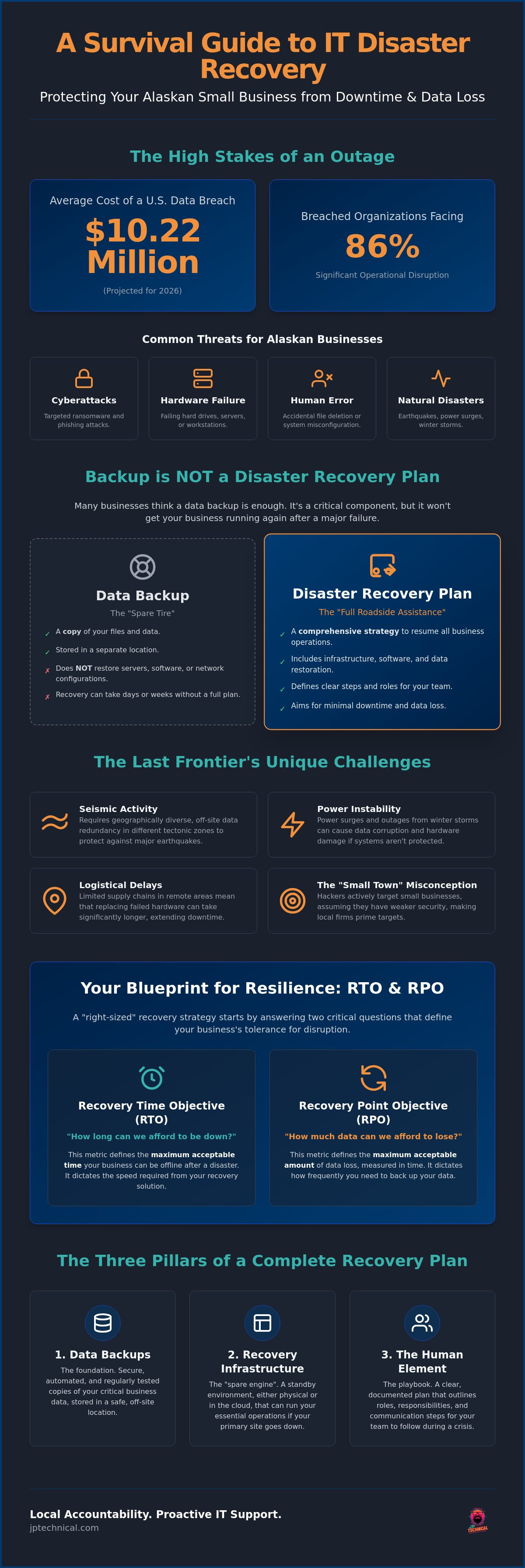
Learn why a simple data backup is just a “spare tire” and how comprehensive IT disaster recovery for small business Alaska serves as the full roadside assistance you need.
Discover why Alaska’s unique geography requires off-site redundancy in different tectonic zones to protect against seismic activity and power instability.
Identify your most critical business functions and conduct a thorough data audit to ensure no vital information is left unprotected.
See how partnering with a local Anchorage-based team provides the proactive care and neighborhood expertise required to navigate modern technical hurdles.
Table of Contents
What is IT Disaster Recovery for Small Businesses in Alaska?
Business Data Backup Solutions vs. Disaster Recovery: Knowing the Difference
How to Build a Right-Sized Recovery Strategy for Your Office
What is IT Disaster Recovery for Small Businesses in Alaska?
IT disaster recovery is the systematic process of regaining access to your data and technology infrastructure after an unexpected outage. It acts as the bridge between a complete shutdown and getting your team back to work. While many people associate the word “disaster” with catastrophic events like the 1964 earthquake, the reality for most local offices is much smaller. A disaster can be a spilled cup of coffee on a main workstation, a failed hard drive in your server room, or a targeted ransomware attack that locks your billing records. Effective IT disaster recovery for small business Alaska requires a plan that scales from these daily mishaps to major regional emergencies.
Distinguishing between local hardware failure and total site loss is a critical part of this strategy. If a single server fails, you need a quick way to restore that specific machine. However, if a fire or flood renders your entire office inaccessible, you need a way to run your business from a different location entirely. According to a 2025 report, the global annual cost of disasters has surpassed $2.3 trillion, but for a local Alaskan firm, the cost is measured in lost hours and damaged reputation. Understanding What is IT Disaster Recovery? helps you realize that it isn’t just about technical files; it’s about maintaining your community’s trust when things go wrong.
The Core Components of a Recovery Plan
A reliable strategy rests on three pillars. First, you have data backups. These are the foundational copies of your information stored safely away from your primary systems. Second, you need recovery infrastructure. This is the “spare” environment where your business operations can run if your primary hardware dies. Finally, you must account for the human element. When the screens go dark, your staff needs to know exactly who is responsible for each step of the restoration process. Without clear roles, technical solutions often stall during the moments they are needed most.
Why Alaska Small Businesses are Unique Targets
Many Alaskan business owners fall into the “small town” misconception, believing that hackers only target large corporations in the lower 48. In reality, cybercriminals often target smaller firms because they assume the defenses are lower. Data from 2026 shows that 86% of organizations that experience a breach suffer significant operational disruption. For a remote business with a limited supply chain, even a few days of downtime can be devastating. This is why local accountability is so important. When the internet goes down or the power fails, having a neighborly partner who can physically show up at your door provides a level of security that a distant, automated help desk simply cannot match. You can start identifying your own risks with a free IT assessment to see where your current defenses stand.
Business Data Backup Solutions vs. Disaster Recovery: Knowing the Difference
Many business owners in Anchorage or Fairbanks believe they are protected because they have a backup drive plugged into their server. Think of a backup like a spare tire in your trunk. It is an essential tool, but if your entire engine fails or you are stuck in a ditch during a blizzard, that spare tire alone will not get you home. You need roadside assistance to get back on the move. This is the core distinction when looking at IT disaster recovery for small business Alaska. One is a component; the other is a complete solution for business continuity.
A backup is the act of copying your data to a safe place for later retrieval. It is a snapshot of your files at a specific moment in time. Disaster recovery is the comprehensive strategy to resume business operations quickly after a failure. If your server is physically destroyed by a fire or a massive power surge, having a backup file does not mean your staff can work. Without a plan to restore your entire environment, including your software and network settings, your business remains at a standstill. Using an SBA disaster preparedness guide can help you begin mapping out these broader operational risks.
Understanding RTO and RPO: The Metrics That Matter
To build a plan that fits your budget, you must define two specific metrics. Recovery Time Objective (RTO) measures how long your business can afford to be offline before the damage becomes critical. Recovery Point Objective (RPO) measures how much data you can afford to lose, often calculated in minutes or hours since your last backup. For most small businesses, the goal is to find a balance between instant recovery and affordability. You do not always need the same systems as a global bank; you need a strategy that matches your specific operational pace and protects your bottom line.
The Evolution of Backup Technology in 2026
The days of swapping physical tapes or external drives are largely over. In 2026, technology has shifted toward automated, encrypted cloud streams that monitor your data in real time. A critical addition to modern plans is the use of immutable backups. Immutable backups provide the ultimate defense against modern encryption attacks by ensuring data cannot be altered or deleted by unauthorized users. This prevents ransomware from reaching into your safety net and locking your only way out. If you are unsure if your current system includes these modern protections, a free IT assessment can help identify gaps in your current strategy.
Alaska-Specific Risks: Preparing for the Last Frontier
Building a strategy for IT disaster recovery for small business Alaska requires a deep understanding of our unique environment. Unlike businesses in the Lower 48, we face specific geological and logistical hurdles that can disrupt operations in an instant. Whether it is the rugged terrain or the vast distances between hubs, these factors dictate how we must protect our digital assets. A plan that works in a flat, temperate state will likely fail here when the first major winter storm or seismic event occurs.
Seismic activity is a constant reality for many Alaskan communities. If you keep all your backups in an office in Anchorage, a major tremor could take out both your primary server and your local safety net simultaneously. Power instability is another silent threat that many owners overlook. In communities like Wasilla or Kenai, “dirty power” and frequent outages can corrupt sensitive databases before you even realize there is a problem. Connectivity is also notoriously fragile. If subsea fiber optic cables are damaged, your “Cloud Backup” might be unreachable precisely when your business is in crisis. Finally, the “Snow Day” factor is real. When staff in Palmer or Fairbanks can’t reach the office due to closed roads, your recovery plan must include secure, reliable remote access so work doesn’t grind to a halt.
Seismic and Environmental Hardening
Protecting your hardware starts with physical placement. Servers and backup appliances should be secured and braced to survive tremors. However, physical hardening at your primary site is only half the battle. You need georedundant data centers located outside the immediate Alaska seismic zone to ensure your files remain reachable if the local infrastructure fails. This is where JP Technical’s physical security expertise provides a critical advantage. We understand how to protect the physical environment that houses your digital assets, ensuring that your hardware is as resilient as your data.
Power Protection and Continuity
Uninterruptible Power Supply (UPS) systems act as your first line of defense against the unpredictable Alaskan grid. These systems don’t just provide temporary power; they filter out surges and “noise” that damage sensitive components over time. If an outage lasts longer than your battery capacity, automated shutdown procedures must trigger to prevent data corruption. Because we are local Alaskans, our maintenance response is measured in hours, not days. You won’t have to wait for a technician to fly in from Seattle while your business sits idle and your customers wait for answers. We are already here, ready to show up when things get difficult.
How to Build a Right-Sized Recovery Strategy for Your Office
Building a plan for IT disaster recovery for small business Alaska starts with a clear-eyed look at your daily operations. You don’t need to protect every single file with the same level of urgency. Instead, identify your most critical business functions first. For a medical clinic, this might be patient records and billing; for a law firm, it might be case files and email. Once you know what matters most, you can allocate your resources effectively without overspending on low-priority data.
Conducting a thorough data audit is the next step. You must know where your information actually lives. It is often scattered across local servers, cloud applications, and even employee mobile devices. A comprehensive strategy accounts for all these locations. Once you have a map of your data, apply the 3-2-1 backup rule. This industry standard involves keeping:
3 copies of your data: The original and two backups.
2 different media types: Such as a local server and a cloud repository.
1 off-site copy: This copy must be stored outside of your immediate geographic area to survive the regional risks discussed earlier.
A plan is only a theory until it is written down. Documentation ensures that anyone on your team can follow the recovery steps during a crisis, even if your primary IT person is unavailable. Finally, you must test and verify your systems. A backup is only as good as its last successful restore. Routine testing proves that your data is not just “saved” but actually recoverable when the clock is ticking.
HIPAA and Regulatory Compliance in Recovery
Medical practices in Anchorage and Fairbanks face strict requirements for data protection. HIPAA mandates that protected health information (PHI) remains accessible and confidential, even during a disaster. Your recovery strategy must include high-level encryption for data both at rest and in transit. This ensures that even if a backup drive is stolen or intercepted, the patient data remains unreadable. If you are handling sensitive records, you can find detailed regulatory guidance through JP Technical’s HIPAA compliance services.
Choosing Between DIY and Managed Recovery
It is tempting to use “cheap” consumer-grade backup solutions, but these often come with hidden costs. These services usually lack the speed, security, and verification features required for professional use. Managed recovery ensures that the “Test and Verify” step actually happens on a schedule. Professional management provides a level of vigilance that prevents small errors from becoming permanent data loss. Managed recovery is an investment in business continuity rather than just an IT expense. To see how a tailored plan can protect your specific operations, schedule a free IT assessment today.
Securing Your Future with Local Managed IT and Backup
Choosing a partner for IT disaster recovery for small business Alaska is a decision that impacts the long-term stability of your entire organization. While distant, automated help desks might offer basic technical support, they lack the local context required to navigate a crisis in the Last Frontier. At JP Technical, we act as a seasoned guardian for your business. We have been part of the Anchorage community since 1996, and we understand that your data represents years of hard work and client trust. Our approach centers on protective vigilance, ensuring that your systems remain predictable even when the environment is not.
The most effective way to handle a disaster is to prevent it from happening in the first place. Proactive maintenance allows us to identify and resolve vulnerabilities before they escalate into an outage. If a hard drive begins to show signs of fatigue or a security patch is missing, we address the issue quietly in the background. This method shifts the focus from reactive “firefighting” to steady, long-term reliability. We believe in being a dedicated ally rather than a distant vendor, providing the human connection that automated systems simply cannot replicate.
The JP Technical Advantage: Protective Vigilance
Our 24/7 monitoring serves as a watchful eye over your infrastructure, catching failing components before they crash. This level of oversight is paired with a straight-shooter approach to IT pricing and value. You won’t find high-pressure jargon or hidden fees here; we provide honest assessments of what your business actually needs to stay operational. Our local technicians know the specific challenges of our region, from the power fluctuations of a Wasilla winter to the logistical hurdles of an Anchorage autumn. This localized expertise means we arrive with the right tools and the right plan the first time.
Next Steps: Your Resilience Audit
You don’t have to wait for the next earthquake or a sudden ransomware wave to test your luck. A professional eyes-on assessment of your current setup can reveal hidden gaps in your safety net before they cause a problem. We will look at your existing backup schedules, verify your recovery objectives, and ensure your plan is documented and ready for action. Taking this step now provides the peace of mind that comes from knowing your business is prepared for whatever comes next. Schedule your free IT assessment with JP Technical today and secure a more resilient future for your Alaskan business.
Building a Resilient Future for Your Alaskan Business
Protecting your livelihood in the Last Frontier requires more than just a basic backup drive and a hope for the best. You’ve seen that a true strategy for IT disaster recovery for small business Alaska involves understanding your recovery objectives and accounting for the specific seismic and power risks of our region. It’s about ensuring that your doors stay open and your client data remains secure even when the unexpected happens. A plan that accounts for both daily mishaps and regional emergencies is the only way to guarantee long-term stability.
Since 1996, we’ve served as a steady guardian for local organizations. Our Anchorage-based support team specializes in HIPAA-compliant IT and data security, providing the neighborly care and technical mastery you need to stay ahead of modern threats. Don’t leave your continuity to chance. You can secure your business with a Free IT Assessment from JP Technical today. We are here to help you navigate the complexities of data protection so you can focus on growing your business with absolute confidence. Your peace of mind is just one conversation away.
Frequently Asked Questions
Is cloud backup enough for my Alaska business?
Cloud backup alone is not enough because of Alaska’s specific connectivity vulnerabilities. If subsea fiber optic cables are damaged, you will lose access to your files exactly when you need them most. A hybrid solution that combines local hardware with cloud redundancy is the only way to ensure immediate recovery. This approach provides the steady reliability needed to keep your office running during an internet outage.
How often should a small business test its disaster recovery plan?
You should test your disaster recovery plan at least twice a year to ensure everything works as expected. Businesses in high-risk sectors or those with complex data needs often benefit from quarterly testing. Regular verification proves that your backups are not just sitting on a drive but are actually restorable. Testing lowers your anxiety by identifying technical hurdles before a real emergency occurs.
Does HIPAA require off-site backups for medical data?
Yes, HIPAA mandates that medical practices have a contingency plan for protecting health information. This includes maintaining a retrievable copy of your data in a separate, secure location. Off-site backups ensure that patient records remain accessible even if your primary office suffers a physical disaster. Using an encrypted, georedundant data center is a standard way to meet these strict regulatory requirements for healthcare providers.
What is the 3-2-1 backup rule and does it apply to cloud storage?
The 3-2-1 rule is a strategy where you keep three copies of your data on two different media types with one copy stored off-site. Cloud storage serves as your off-site copy, but you still need local versions on a server or separate hardware. This redundancy ensures that a single failure does not wipe out your entire history. It’s a structured way to manage business risks and maintain continuity.
How much downtime can a typical small business survive?
Most small businesses begin to face critical operational failure after 24 hours of total downtime. While larger enterprises might measure survival in hours, smaller local firms often have thinner margins for error. Defining your Recovery Time Objective (RTO) helps you understand exactly how long you can stay offline before the financial impact becomes irreversible. A solid plan reduces this window to minutes instead of days.
Can a disaster recovery plan protect me from ransomware?
A comprehensive IT disaster recovery for small business Alaska plan is your best defense against ransomware. By using immutable backups, you ensure that your data cannot be altered or deleted by an attacker. If your primary systems are encrypted, you simply roll back to a clean snapshot from before the infection. This proactive approach allows you to ignore ransom demands and resume operations with minimal disruption.
What happens to my data if the internet goes out in Anchorage?
If the internet goes out in Anchorage, your access to cloud-only data will stop immediately. However, a plan that includes a local backup appliance allows you to keep working on your local network. Your data remains safe on your physical hardware, and you can restore files without an active web connection. This local accountability is why we emphasize hybrid solutions for businesses in our region.
How do I know if my current IT provider is actually backing up my data?
You should receive automated daily reports that confirm the success of every backup job. If your provider isn’t sending these, it’s a sign that your IT disaster recovery for small business Alaska needs a closer look. A reliable partner will also perform regular “fire drills” where they restore a random file to prove the system works. Transparent communication is the foundation of a stable partnership.
 Article by
Colter Hobbs