Remote IT Support in Anchorage: A Practical Guide for Business Owners
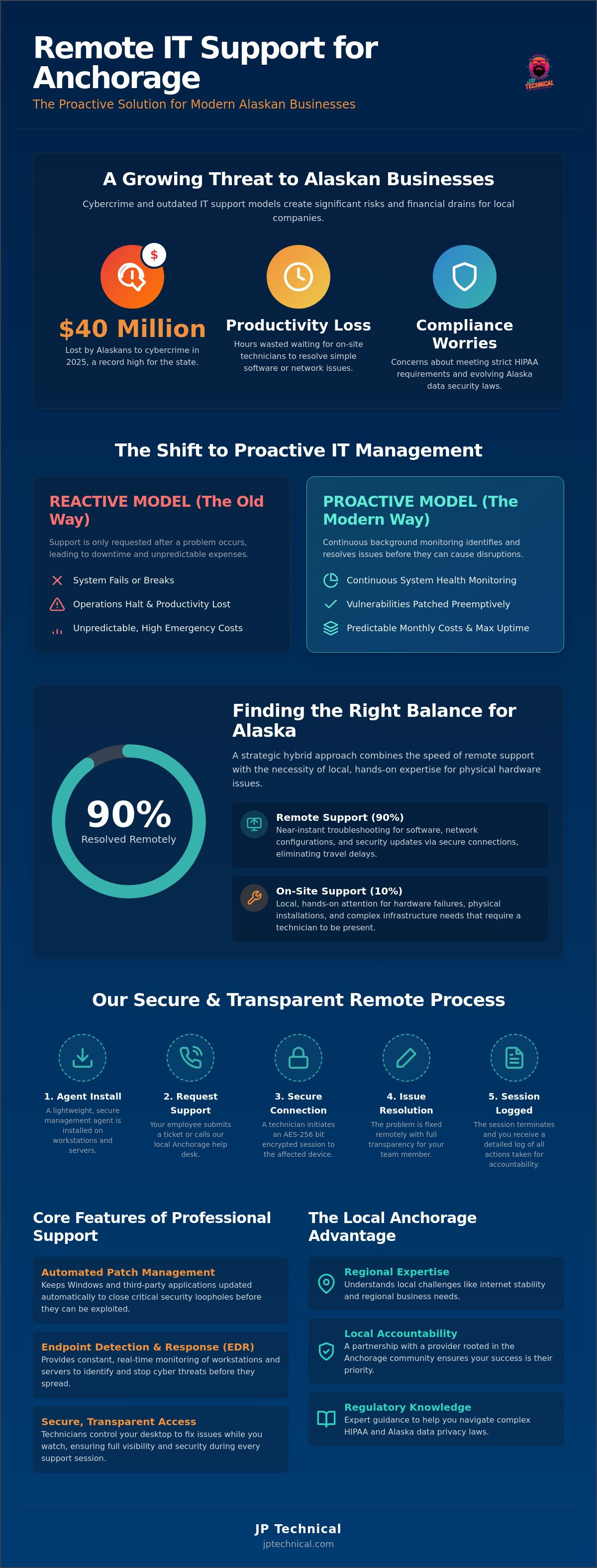
In 2025, Alaskans lost nearly $40 million to cybercrime, the highest financial loss ever reported in our state. For a local business owner, these numbers represent a real threat to the stability you’ve worked hard to build. You likely feel the frustration of waiting hours for a technician to arrive on-site for a simple fix while your team sits idle. It’s common to worry if your current setup can handle new Alaska data security requirements or maintain strict HIPAA compliance. Reliable remote IT support Anchorage businesses can depend on should provide peace of mind, not more technical anxiety.
You deserve technology that works as hard as you do without the burden of a full-time in-house salary. This guide explains how to implement secure, professional remote support that keeps your operations running smoothly. We’ll show you how to achieve zero-friction technical help and predictable monthly costs while ensuring your security protocols are ready for any regulatory audit. You’ll learn how to establish a stable partnership with local experts who prioritize your uptime and your data’s safety through proactive vigilance.
Key Takeaways
Effective remote IT support Anchorage businesses rely on eliminates travel delays, providing near-instant troubleshooting for software and network issues via secure connections.
A strategic balance between remote monitoring and on-site capability ensures that 90% of issues are fixed digitally while hardware failures still receive local, hands-on attention.
Local accountability matters; partnering with a provider rooted in Anchorage ensures your IT strategy accounts for regional challenges like internet stability and local regulations.
Secure management agents and local help desks create a protective layer for your data, helping you navigate complex HIPAA requirements and evolving Alaska data privacy laws.
Transitioning to a managed support model offers predictable monthly costs, giving you the expertise of a full IT department without the overhead of an in-house team.
Table of Contents
What is Remote IT Support and How Does it Benefit Anchorage Businesses?
How Remote IT Support Works: A Step-by-Step Security Overview
Remote vs. On-site IT Support: Finding the Right Balance for Alaska
How to Evaluate a Remote IT Provider: A Checklist for Local Owners
Why a Local Anchorage Partner is Essential for “Remote” Success
What is Remote IT Support and How Does it Benefit Anchorage Businesses?
If you’ve ever wondered what is remote support?, it’s the professional practice of using secure software to resolve technical issues from a distance. For your business, this means a technician can access your computer or network through a encrypted internet connection to fix problems without being physically present. We use these tools to troubleshoot software bugs, configure complex network settings, and update security protocols. It’s a direct, efficient way to manage technology that keeps your team working.
Utilizing remote IT support Anchorage providers offer saves you one of your most valuable resources: time. In a city where traffic or sudden winter weather can turn a short drive into a long delay, waiting for an on-site technician is a drain on your budget. Remote access provides near-instant help for your staff in Anchorage or Wasilla. It also lowers your overhead. You don’t have to pay for a technician’s travel time or carry the high salary of a full-time in-house employee. This shift leads to more predictable monthly costs compared to the erratic bills of a traditional break-fix model.
The “Proactive vs. Reactive” Support Model
The old way of doing things was reactive. You called a technician only when something broke. Productivity stopped, and your team waited for a fix. Modern remote IT support Anchorage businesses use is proactive. We use specialized tools to monitor your system health quietly in the background. If a hard drive shows signs of failure or a server reaches capacity, we see it before you do. This constant vigilance allows us to apply patches and fix vulnerabilities before they become expensive emergencies. Proactive maintenance is now the standard for local businesses that value continuity.
Key Features of Professional Remote Support
Professional remote care involves more than just a quick screen share. It’s a comprehensive security and maintenance strategy that works behind the scenes. Key features include:
Secure screen sharing: Technicians control your desktop to fix issues while you watch, ensuring transparency and security.
Automated patch management: We keep Windows and third-party applications updated to close security loopholes automatically.
Real-time endpoint detection and response (EDR): This provides constant monitoring to identify and stop cyber threats before they spread through your network.
By focusing on these core functions, remote support acts as a silent guardian for your operations. It ensures your systems remain stable and compliant without requiring constant manual intervention from your staff.
How Remote IT Support Works: A Step-by-Step Security Overview
Implementing professional remote IT support Anchorage businesses can trust starts with a simple, secure setup. We don’t use invasive software that slows down your machines or compromises your privacy. Instead, we install a lightweight management agent on your workstations and servers. This small application acts as a secure bridge between your office and our local experts. It allows us to monitor system health in the background and provides your staff with a direct, encrypted line to help when a technical hurdle appears.
When a problem occurs, your employee simply submits a ticket or calls our local Anchorage help desk. Because our team is based right here, you’re talking to someone who understands the local business environment. Our technicians then initiate a secure tunnel to the specific device. This process follows strict SBA cybersecurity guidelines to ensure your network remains protected during the intervention. After the fix is complete, the session terminates immediately. The management agent then remains dormant until the next requested session. You receive a detailed log of every action taken, which ensures full transparency and accountability.
Encryption and Access Protocols
Security is the foundation of our remote workflow. We use AES-256 bit encryption for every session, providing the same level of protection used by financial institutions to secure sensitive data. Access is never open by default. Every technician must pass through multi-factor authentication (MFA) before they can connect to your systems. We also utilize permission-based entry, which means technicians only see the specific applications or screens you allow. You remain in control of your data at all times. If you want to see how these protocols fit your specific network, a free IT assessment can identify any existing gaps in your current setup.
HIPAA Compliance in a Remote Environment
For medical practices across Alaska, maintaining data privacy is a legal necessity. Our remote IT support Anchorage services are designed with these requirements in mind. We maintain strict audit trails that track every remote action, providing the documentation you need for regulatory reporting. This level of vigilance ensures that remote troubleshooting never compromises patient confidentiality or violates federal standards. You can learn more about our HIPAA compliant IT services to see how we protect healthcare providers from both technical failures and compliance risks.
Remote vs. On-site IT Support: Finding the Right Balance for Alaska
Choosing between remote and on-site assistance isn’t an “either-or” decision for a modern business. It’s about finding a balance that prioritizes both speed and physical reliability. Data shows that remote IT support Anchorage providers offer can resolve roughly 90% of common technical issues. This includes tasks like resetting forgotten passwords, fixing software glitches, and managing user permissions. These problems are solved digitally in minutes, which keeps your team productive without the cost or delay of a service call.
However, technology is still tied to physical hardware. If a server power supply fails or a network switch burns out, no amount of remote troubleshooting will bring your office back online. This is where the hybrid model becomes essential. You benefit from the near-instant response of remote tools for daily hurdles, but you maintain the safety net of local technicians who can arrive at your door for complex tasks like security camera installation or hardware repairs. This combination ensures that your business stays operational regardless of the problem’s nature.
Out-of-state IT firms often fail to account for the “Alaska Factor.” When a local internet outage occurs or extreme weather impacts infrastructure, a technician in a different time zone is often powerless to help. They don’t have the local accountability or the physical presence to troubleshoot a failed firewall or a cut fiber line. A local partner understands our unique geography and remains reachable when digital connections fail. This local presence transforms IT from a distant utility into a reliable partnership.
When Remote Support is the Best Choice
Remote assistance is the most efficient solution for issues that live entirely within your software or cloud environment. It’s the ideal choice for:
Software installations: Deploying new tools across your entire team simultaneously.
Email and cloud migrations: Configuring Outlook or moving files to secure cloud storage.
Security updates: Applying critical patches to your operating system and third-party apps in the background.
When You Need a Technician at Your Anchorage Office
Physical intervention is required whenever the “plumbing” of your technology is compromised. You’ll need a local expert on-site for:
Network hardware replacement: Swapping out failed routers, switches, or firewalls that control your connectivity.
Physical security audits: Repairing access control systems or adjusting surveillance coverage.
Infrastructure setup: Installing cabling and workstations for new office locations in Palmer, Kenai, or within Anchorage.
By using remote IT support Anchorage experts provide for daily maintenance and keeping local technicians on standby for physical needs, you create a resilient environment. This strategy minimizes downtime and ensures your technology remains a stable foundation for your business growth.
How to Evaluate a Remote IT Provider: A Checklist for Local Owners
Selecting a partner for remote IT support Anchorage businesses rely on requires looking beyond a polished website. You need a team that shares your commitment to local stability and long term growth. The right provider acts as a vigilant guardian for your data, not just a distant help desk. Before you sign a contract, use this checklist to ensure your provider has the local roots and technical mastery necessary to protect your operations.
Verify Local Accountability: Ask if the provider has a physical office in Anchorage or just a PO box. If a critical piece of hardware fails, a local team can be at your door while an out-of-state vendor is still trying to find a subcontractor.
Analyze the Service Level Agreement (SLA): A vague promise of “fast support” isn’t enough. Look for specific response time guarantees. You need to know exactly how long it takes for a technician to start working on your ticket.
Demand Security First: Modern threats require more than basic protection. Ensure that Endpoint Detection and Response (EDR) and professional antivirus are included as standard parts of their package.
Confirm Scalability: Your IT partner should manage your growth from 5 employees to 50 without a hitch. Ask how they’ve helped other local businesses expand their infrastructure over time.
Transparency in Pricing
Unexpected bills are a common source of frustration for business owners. You should avoid “hidden fee” structures where every remote session results in an extra charge. Instead, look for flat-rate managed services that provide unlimited remote help within a predictable monthly budget. This model aligns your interests with the provider’s interests; they’re motivated to keep your systems running perfectly to minimize tickets. You can view our transparent IT service pricing to see how a predictable model supports your bottom line.
The Importance of a Dedicated Account Manager
You shouldn’t be treated as “just another ticket” in a massive call center. A quality partnership involves a technician who actually knows your Anchorage office layout and recognizes your staff. This familiarity speeds up troubleshooting and ensures that technical advice fits your specific workflow. Regular business reviews are also essential. These meetings help align your IT strategy with your 2026 growth goals, ensuring your technology remains an asset rather than a bottleneck. If you’re ready to see how a local partnership can stabilize your network, you can schedule a free IT assessment to review your current setup.
Why a Local Anchorage Partner is Essential for “Remote” Success
Many national providers offer remote services, but they often struggle with the “Alaska Factor.” When a major winter storm impacts local infrastructure or a specific regional internet outage occurs, an out-of-state call center won’t have the context to help you. They don’t understand our unique regulatory environment or the physical distance between our communities. Choosing remote IT support Anchorage experts provide means you have a partner who lives and works in the same conditions you do. We don’t just see a ticket; we see a neighbor who needs to keep their doors open.
JP Technical has provided local technology solutions since 1996. We combine nearly 30 years of local expertise with the latest remote management tools. This longevity allows us to act as a straight-shooter IT department for our clients. We focus on long-term stability rather than quick fixes. If a problem can’t be resolved through an encrypted session, we provide a seamless transition to on-site emergency response. This hybrid capability is something a remote-only vendor simply cannot offer. It ensures that your support never hits a dead end when a physical intervention is required.
The JP Technical Advantage: Protective Vigilance
Our philosophy centers on protective vigilance. We monitor your network health quietly in the background so you can focus entirely on running your business. Because we also specialize in physical security and surveillance, we offer a total protection package. This integration ensures that both your digital assets and your physical office remain secure under one watchful eye. We pride ourselves on being the steady, reliable guardian that Anchorage small businesses need to stay competitive and compliant.
Getting Started: Your Roadmap to Better Support
Improving your technology shouldn’t be a stressful process. We follow a methodical, two-step roadmap to ensure your systems are stable and secure from day one:
Step 1: Schedule a free assessment. We’ll identify your current security gaps and technical bottlenecks without any high-pressure sales tactics.
Step 2: Onboarding and deployment. We’ll install our secure remote agents and begin the proactive monitoring that prevents downtime.
Take the first step toward predictable IT costs and reliable protection. You can book your Free IT Assessment today to start building a more resilient business foundation.
Building a Resilient Technology Foundation for Your Office
Technology should be a silent engine that drives your business forward, not a source of constant friction. By implementing professional remote IT support Anchorage businesses can trust, you gain the efficiency of near-instant troubleshooting without losing the safety of a local partner. You now understand how a proactive model prevents downtime and why HIPAA-compliant security protocols are essential for long-term stability in our evolving regulatory landscape.
JP Technical has served the Anchorage community since 1996. Our local technicians understand the specific challenges of operating in Alaska and specialize in the complex requirements of HIPAA compliance. We act as your dedicated guardian, ensuring your systems remain secure and your costs stay predictable. We’re ready to show you how a steady, professional partnership can lower your stress and protect your bottom line.
Schedule Your Free IT Assessment with JP Technical today to identify your current security gaps and streamline your operations. We’re here to help you navigate technical hurdles so you can focus on your business growth with complete peace of mind.
Frequently Asked Questions
How fast is the response time for remote IT support in Anchorage?
Response times for remote IT support Anchorage businesses rely on are typically much faster than traditional on-site visits. Because there’s no travel time involved, a technician can often begin troubleshooting your issue within minutes of a ticket being submitted. The exact timing depends on the priority level defined in your Service Level Agreement (SLA), but urgent issues receive immediate attention to minimize downtime.
Is remote IT support safe for businesses that handle medical records?
It’s safe if your provider uses enterprise-grade encryption and follows strict security protocols. We use AES-256 bit encryption and multi-factor authentication to protect every session. For medical practices, we maintain the detailed audit logs required for HIPAA compliance. This level of vigilance ensures that your patient records remain private even while we’re fixing a technical issue.
What happens if our internet goes out and we need IT help?
If your internet connection fails, remote tools cannot bridge the gap. This is why a local partnership is essential. While out-of-state vendors are powerless during a local outage, our Anchorage-based technicians can drive to your office to troubleshoot the hardware or coordinate with your ISP. We provide the physical safety net that remote-only companies lack.
Can remote IT support help with my physical security cameras?
Most modern surveillance systems are network-connected, which allows for remote management. Technicians can update your camera software, check for recording errors, and adjust user permissions from our local office. If the issue involves a physical camera failure or wiring problem, we then transition to an on-site visit to resolve the hardware failure directly.
Do I need special hardware for a remote IT company to manage my office?
You don’t need to purchase specialized hardware to start receiving professional support. We simply install a lightweight software agent on your existing workstations and servers. This agent facilitates the secure connection and allows us to monitor your system health in the background. It’s a non-invasive setup that works with your current business technology.
How much does remote IT support typically cost for an Anchorage small business?
Most professional providers use a managed services model with a predictable monthly fee. This rate is usually based on the number of users or devices in your office. This approach provides you with a stable budget and ensures your IT partner is motivated to keep your systems running perfectly. You should avoid hourly “break-fix” models that lead to unpredictable expenses.
 Article by
Colter Hobbs