Small Business Server Maintenance in Anchorage: A Proactive 2026 Guide
What if a single hardware failure on a Tuesday morning cost your Anchorage business $50,000 before the lunch rush? For many local owners, this isn’t just a hypothetical fear; it’s a looming reality that keeps them up at night. You likely recognize the anxiety of staring at a complex update schedule or wondering if your current backup would actually hold up during a HIPAA audit. It’s difficult to feel confident in your digital security when you’re also trying to manage daily operations without a dedicated in-house IT expert. Implementing a proactive strategy for small business server maintenance Anchorage is the only way to move from reactive firefighting to steady, predictable growth.
This guide will teach you how to protect your company from costly downtime with a maintenance plan tailored for our unique Alaskan environment. We’ll explore the critical 2026 HIPAA updates, the necessity of multi-factor authentication, and how a local guardian approach ensures your network remains fast and stable. By the end, you’ll have a clear path toward secure data, regulatory compliance, and manageable IT costs that don’t catch you by surprise.
Key Takeaways
Understand why reactive repairs are significantly more expensive than proactive care by calculating the true cost of server downtime for your operations.
Learn a simple two-step audit process that combines physical hardware inspections with system log analysis to identify early warning signs of failure.
Discover how a managed IT model offers predictable costs and superior protection compared to traditional small business server maintenance Anchorage break-fix methods.
Identify the essential security layers required for 2026, including Endpoint Detection and Response (EDR) and updated HIPAA compliance protocols for local offices.
See how a local technical partner provides the on-site support and customized maintenance scheduling necessary to ensure long-term network stability.
Table of Contents
The Critical Role of Server Maintenance for Anchorage Small Businesses
Comparing Maintenance Models: Break-Fix vs. Proactive Managed IT
Specialized Maintenance: Security, Backups, and HIPAA Compliance
Implementing a Professional Maintenance Plan with JP Technical
The Critical Role of Server Maintenance for Anchorage Small Businesses
Your server acts as the central nervous system of your entire company. If you’ve ever looked up what is a server in a technical manual, the definition might seem abstract, but in your office, it’s the engine that drives every file share, email, and database. For many, small business server maintenance Anchorage is something they only think about after a crash occurs. This reactive mindset turns a manageable piece of equipment into a ticking financial time bomb. A proactive approach treats your server like the critical asset it is, ensuring it remains a silent, reliable partner in your daily work.
Identifying the Real Cost of Server Downtime
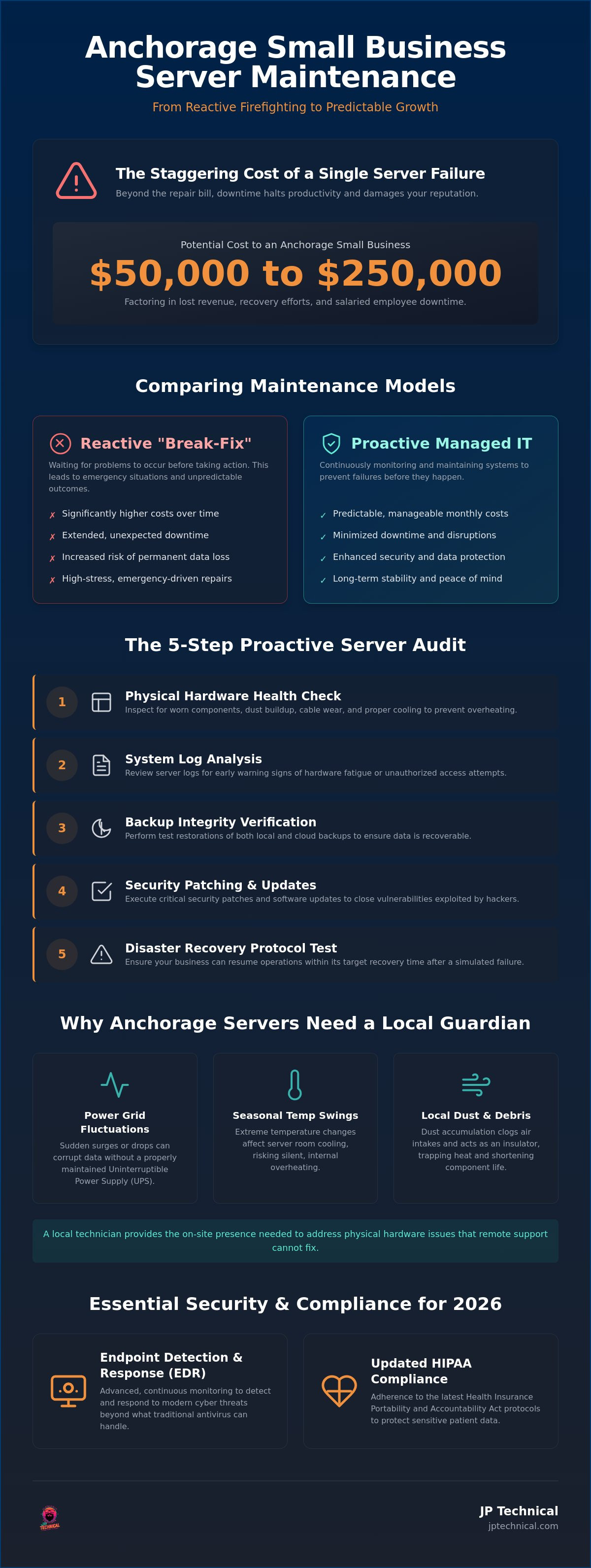
When a server fails in a 10-person office, the clock starts ticking on more than just a repair bill. You’re paying for ten salaries while productivity sits at zero. Research suggests that a single server failure can cost an Anchorage small business between $50,000 and $250,000 when you factor in lost revenue and recovery efforts. Beyond the immediate financial sting, there’s the damage to your reputation. Business continuity in 2026 is the ability to maintain essential functions during and after a technical disaster has occurred.
Regional Factors Affecting Server Health in Alaska
Operating hardware in the North presents specific environmental hurdles that remote-only IT firms often ignore. Anchorage businesses must contend with local power grid fluctuations that can cause sudden surges or drops in voltage. Without a properly maintained Uninterruptible Power Supply (UPS), these events can corrupt data. Seasonal shifts also play a role. Our temperature swings affect how server rooms are cooled, and local dust can quickly clog air intakes, leading to silent, internal overheating.
This is where the “local guardian” model proves its worth. Having a technician who understands the physical reality of your office provides a safety net that a voice on a phone cannot. If a hardware component fails physically, you need someone who can be on-site within the hour to swap a drive or reset a connection. Relying solely on remote support leaves you vulnerable to physical issues that no amount of software patching can fix. True small business server maintenance Anchorage requires a blend of digital vigilance and physical presence to keep the “brain” of your business healthy year-round.
How to Perform a Routine Small Business Server Audit
A reliable server audit is more than a quick glance at a dashboard. It requires a systematic review of the machine’s physical health and its digital integrity. For effective small business server maintenance Anchorage, you should follow a five-step process to catch minor issues before they escalate into total system failures. This routine prevents the unexpected downtime that disrupts your workflow and frustrates your team.
Step 1: Conduct a visual and physical hardware health check to identify worn components or cooling issues.
Step 2: Review and analyze server system logs to find early warning signs of hardware fatigue or unauthorized access attempts.
Step 3: Verify the integrity of local and cloud-based backups by performing a test restoration of a single file.
Step 4: Execute critical security patches and software updates to close vulnerabilities that hackers exploit.
Step 5: Test disaster recovery protocols to ensure your business can resume operations within your target recovery time.
Physical Hardware Inspection and Environmental Controls
Hardware longevity in Alaska depends on more than just electricity. You must regularly inspect your server for cable wear, unusual fan noise, or amber status lights. Dust accumulation is a common issue in Anchorage offices; it acts as an insulator that traps heat and shortens component life. Your server should also be protected by physical access controls to prevent unauthorized tampering. Check your Uninterruptible Power Supply (UPS) every quarter. If the battery can’t hold a charge during a simulated power drop, your data is at risk during the next local outage.
Software Updates and Patch Management Protocols
Software maintenance is a two-part process. Standard OS updates often add features or improve performance, but critical security patches are designed to block active threats. Following guidelines for Cybersecurity for Small Business ensures you aren’t leaving the door open for ransomware. A “set it and forget it” strategy is dangerous because updates can sometimes fail or cause conflicts with other software. In 2026, effective patch management requires a 24/7 monitoring approach to identify and deploy fixes the moment they’re released. If you’re unsure if your current system is up to date, a free IT assessment can help identify hidden vulnerabilities in your network.
Comparing Maintenance Models: Break-Fix vs. Proactive Managed IT
The choice between “break-fix” support and managed services determines whether your technology is a tool or a liability. Many owners mistakenly believe they save money by only calling a technician when something stops working. This is the break-fix model. It’s built on a fundamental conflict of interest; the provider only makes money when your business is suffering. In contrast, small business server maintenance Anchorage through a managed IT partnership aligns your goals with your provider’s. If your network stays up and runs efficiently, everyone wins.
The Hidden Risks of the “Wait Until It Breaks” Approach
Waiting for a server to fail is the most expensive way to run a company. When a critical component dies on a Friday afternoon, you’re often forced to pay an “emergency premium” for urgent, after-hours repairs. These bills can quickly eclipse the cost of an entire year of routine care. Beyond the financial sting, you face the very real risk of permanent data loss if the failure occurs during a backup gap. A reactive repair is often just a temporary fix designed to get you through the day rather than a long-term solution that prevents the next crash.
Advantages of Local Anchorage IT Partnerships
A local partnership offers a level of accountability that remote-only call centers simply cannot match. You need a “straight-shooter” who understands the specific challenges of doing business in Alaska. When physical hardware needs immediate attention, a local technician provides faster response times, arriving on-site while a remote provider is still trying to diagnose the issue through a screen. This proactive care also extends the lifespan of your expensive hardware by identifying mechanical stresses, like failing fans or drive errors, before they turn into catastrophic breaks.
Maintaining this level of vigilance is also essential for regulatory alignment. For example, staying compliant with the HIPAA Security Rule requires ongoing administrative and technical safeguards that a “fix it when it breaks” approach cannot provide. By choosing transparent pricing models, you swap unpredictable emergency bills for a steady, manageable monthly investment. This shift provides the peace of mind that your data is secure and your network is being watched by a dedicated local guardian who is invested in your long-term success.
Specialized Maintenance: Security, Backups, and HIPAA Compliance
Security in 2026 is no longer about just keeping people out; it’s about constant vigilance inside your network. For Anchorage medical and professional offices, this vigilance is a legal requirement rather than a suggestion. Effective small business server maintenance Anchorage must include specialized protocols that address the rising complexity of cyber threats. Standard antivirus software is often insufficient against modern attacks. You need Endpoint Detection and Response (EDR) to monitor for suspicious behavior in real-time, providing a layer of protection that static programs miss.
Hardening Your Server Against Modern Cyber Threats
Hardening starts with a strict review of firewall configurations and user access permissions. You should only grant the minimum level of access required for an employee to do their job. For healthcare providers, regular HIPAA compliance audits are essential to ensure patient data remains encrypted and secure. Proactive maintenance prevents 90% of common ransomware entries by closing the technical gaps that attackers use to gain a foothold. Total protection also means looking at the physical environment. Integrating physical surveillance with digital monitoring ensures that your hardware is safe from both hackers and unauthorized physical access.
Disaster Recovery: More Than Just a Daily Backup
A backup is only a copy of data, but disaster recovery is a plan for action. You must define a clear Recovery Time Objective (RTO) for your operations. For an Anchorage small business, RTO is the maximum amount of time your operations can stay offline before the financial damage becomes irreversible. We utilize the “3-2-1” backup rule as a non-negotiable standard: keep three copies of your data, on two different types of media, with at least one copy stored offsite. This ensures that a single point of failure won’t wipe out your entire business history.
Testing these backups is the only way to guarantee they’ll work when you need them. A backup is useless if it hasn’t been verified through a successful restoration test. Cloud redundancy plays a vital role here, ensuring business continuity even if a local disaster impacts your physical office. If you’re concerned about your current security posture or compliance status, you can request a free IT assessment to see where your defenses might be thin.
Implementing a Professional Maintenance Plan with JP Technical
Since 1996, we’ve served as a dedicated ally to the local business community. Effective small business server maintenance Anchorage requires more than just technical knowledge; it requires a commitment to showing up when things get difficult. We act as a local guardian for your office technology. This means we handle the complex updates, regulatory hurdles, and security threats quietly in the background. Our goal is to lower your anxiety by providing a stable environment where technology is a tool, not a source of stress. We value human connection over automated interactions, ensuring you always have a seasoned professional to guide your IT decisions.
Customizing Your IT Strategy for Long-Term Growth
Your technology should grow alongside your team. As your Anchorage staff expands, your server infrastructure must scale to handle the increased load without sacrificing speed. If your hardware is neglected, it eventually becomes a bottleneck for your employees. We help you balance reliable on-premise hardware with secure cloud integration to ensure your data is accessible yet protected. Steady, methodical maintenance prevents “tech debt,” which is the accumulation of outdated systems that eventually lead to expensive, forced upgrades. By addressing small issues now, you avoid the massive emergency repair bills that hit when a neglected system finally fails.
Getting Started with a Free IT Assessment
The first step toward a stable network is understanding your current baseline. During a professional free IT assessment, we look for immediate security gaps and hardware risks that could lead to a crash. We review your backup logs, check your physical environment for cooling issues, and evaluate your HIPAA compliance status. This process isn’t about high-pressure sales tactics. It’s about providing an honest, “straight-shooter” evaluation of your office technology so you can make informed decisions about your company’s safety and continuity.
Once we’ve identified the vulnerabilities, we create a clear roadmap for your future. This plan provides a structured schedule for patch management and disaster recovery testing, ensuring your business remains secure and compliant with 2026 standards. If you’re tired of the anxiety that comes with unexpected downtime during peak hours, a structured small business server maintenance Anchorage plan provides the predictability you need. You’ll gain the confidence that your data is backed up and your network is fast, allowing you to move forward with the peace of mind that comes from a reliable, long-term partnership.
Secure Your Business Continuity for the Years Ahead
Shifting from a reactive “break-fix” mindset to a proactive partnership is the most effective way to eliminate the fear of unexpected downtime. By prioritizing routine audits and staying ahead of 2026 HIPAA regulations, you ensure your network remains a reliable asset rather than a liability. Investing in small business server maintenance Anchorage isn’t just about hardware health; it’s about protecting the long-term reputation and financial stability of your company. Local vigilance matters in our unique environment, where physical hardware care is just as critical as digital security.
Since 1996, we’ve provided Anchorage businesses with the professional authority and neighborly care they need to navigate complex IT hurdles. Our HIPAA-compliant experts act as a local guardian for your technology, handling the technical heavy lifting so you can focus on your daily operations. You don’t have to manage these risks alone. Secure your business with a Free IT Assessment from JP Technical today and take the first step toward a predictable, secure future. Your business deserves a stable foundation, and we’re here to help you build it.
Frequently Asked Questions
How often should a small business server be maintained?
You should perform software maintenance monthly and physical hardware inspections at least quarterly. Monthly updates ensure security patches are current, while quarterly checks help identify physical issues like dust buildup or fan failure before they cause a crash. Consistent small business server maintenance Anchorage prevents the accumulation of minor errors that eventually lead to major system failures and lost revenue.
What is the difference between remote and on-site server maintenance?
Remote maintenance handles software updates, log monitoring, and security patching through a secure digital connection. On-site maintenance is required for physical tasks like cleaning hardware, checking battery backups, and inspecting cables. While remote support is fast, local on-site care is essential in Anchorage to address environmental factors and physical component wear that software cannot detect from a distance.
Does my Anchorage business really need a physical server in 2026?
Many Anchorage businesses still benefit from a physical server in 2026, especially those requiring high-speed local file access or specialized software. While cloud options are popular, a hybrid approach often provides the best balance of performance and reliability. Local hardware ensures your team can keep working even if there’s a major internet service disruption in the region, providing a critical layer of continuity.
How much does monthly server maintenance typically cost for a small business?
Monthly costs for server maintenance depend on the number of users, the complexity of your network, and your specific security requirements. Most professional providers move away from flat rates toward customized quotes that reflect your actual operational needs. Investing in a managed IT plan is generally more predictable than paying for emergency repairs and the high cost of lost productivity after a system failure.
What are the specific HIPAA requirements for server maintenance in Alaska?
HIPAA requirements in 2026 demand mandatory encryption for data at rest and in transit, along with multi-factor authentication for all systems containing health information. You must also conduct annual risk assessments and maintain documented remediation plans. In Alaska, you must also comply with the Alaska Personal Information Protection Act, which governs a broader range of consumer data protection beyond medical records.
Can I perform server maintenance myself to save money?
You can perform basic visual checks, but professional maintenance is recommended for complex software updates and security hardening. Misconfiguring a single patch or missing a critical system log can leave your business vulnerable to ransomware or regulatory fines. Professional small business server maintenance Anchorage provides the accountability and expertise needed to ensure your data is truly secure and compliant with modern standards.
What should I do if my server crashes before my next scheduled maintenance?
If your server crashes, you should immediately activate your disaster recovery protocol to restore operations from your most recent verified backup. Check your physical connections and power supply first, but avoid attempting complex software repairs that could lead to further data loss. Having a verified backup strategy ensures that a hardware failure doesn’t turn into a permanent loss of business information or client trust.
How does JP Technical handle emergency server repairs in Anchorage?
We prioritize emergency repairs for our partners by deploying local technicians who can be on-site quickly in the Anchorage area. Our team focuses on rapid restoration through established disaster recovery plans and immediate hardware troubleshooting. Because we monitor your systems 24/7, we often identify and begin addressing critical failures before you even realize there’s a problem, ensuring your business stays operational.
 Article by
Colter Hobbs