Ransomware Protection for Business in Anchorage: 5 Dangerous Myths Debunked
Did you know that 88% of data breaches at small and medium-sized businesses now involve ransomware? Many owners in our community feel safe because they believe they aren’t “big enough” to be a target, but modern cyberattacks are automated and don’t care about the size of your payroll. Finding effective ransomware protection for business Anchorage requires moving past outdated assumptions that no longer hold up in 2026. If you’re still relying on basic antivirus and a prayer, your company’s data is likely more exposed than you realize.
It’s understandable to feel frustrated by technical jargon like EDR or Zero Trust, especially when you’re managing tight budgets and daily operations. We agree that cybersecurity should provide peace of mind, not a list of confusing expenses. This article clarifies the real risks facing Alaska today, including the impact of new requirements from Alaska Senate Bill 134. You’ll discover why common assumptions are putting your team at risk and learn the modern strategies needed to stay secure. We’ll break down five dangerous myths so you can identify gaps in your current security and find a local partner who understands the unique dynamics of the Anchorage business community.
Key Takeaways
Understand why automated “harvesters” make every IP address a potential target, regardless of your company’s size or remote location.
Identify the critical differences between legacy antivirus and modern behavioral analysis to stop fileless attacks that bypass traditional scans.
Learn about “double extortion” tactics and why modern ransomware now specifically targets and deletes your network backups.
Discover how to implement effective ransomware protection for business Anchorage through essential steps like Multi-Factor Authentication and the Principle of Least Privilege.
Explore the operational advantages of partnering with a local guardian who provides immediate on-site support and understands Alaskan infrastructure.
Table of Contents
Myth #1: “Our Anchorage Business is Too Small and Remote to be a Target”
Myth #2: “Standard Antivirus Software is a Complete Shield Against Ransomware”
Myth #3: “We Don’t Need Advanced Protection Because We Back Up Our Data”
Practical Ransomware Defense Strategies for the Alaska Market
Partnering with a Local Guardian for Proactive Ransomware Defense
Myth #1: “Our Anchorage Business is Too Small and Remote to be a Target”
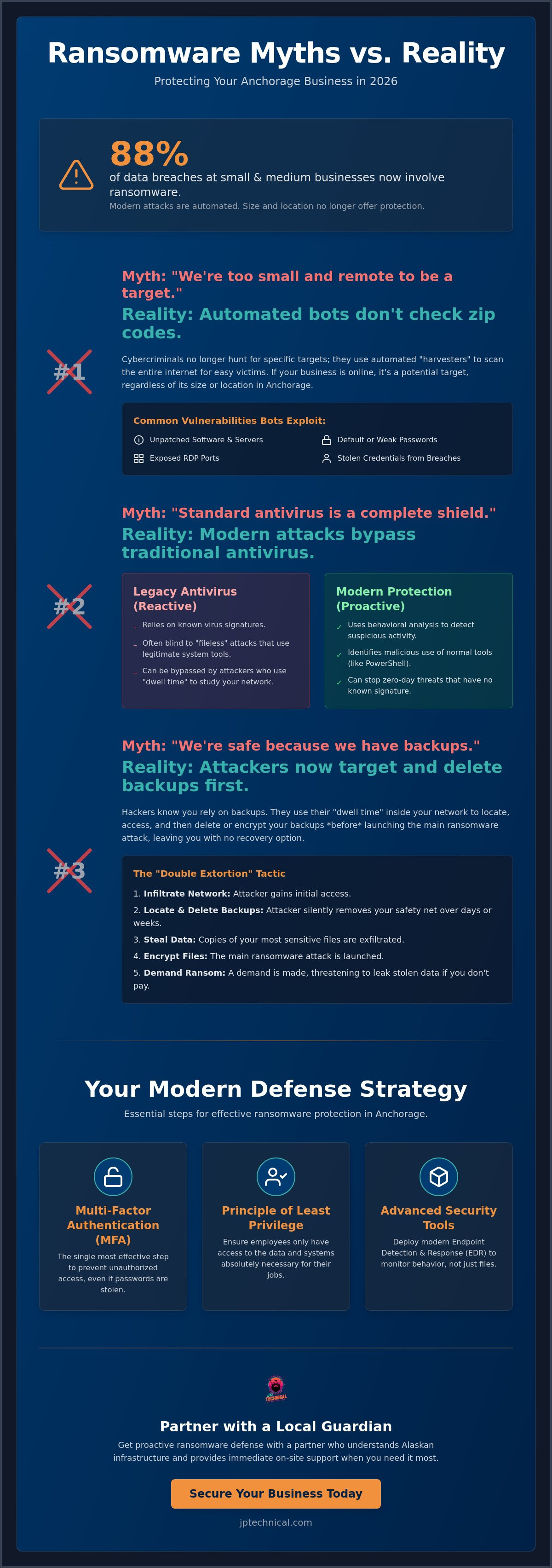
Many Anchorage business owners believe their physical distance from the Lower 48 serves as a natural shield. It’s a comfortable thought, but it’s fundamentally incorrect in 2026. Cybercriminals no longer act like “hunters” who carefully select a single high-value target. Instead, they operate like “harvesters.” For a comprehensive overview of ransomware and its evolution, one can see how it has shifted from a niche threat to a global commodity. Today, Ransomware-as-a-Service (RaaS) allows even low-level criminals to launch sophisticated attacks against any business that leaves a digital door unlocked. They aren’t looking for “big” targets; they’re looking for easy ones.
The Geographic Isolation Fallacy
Believing that “Alaska is a fortress” is a dangerous liability. Our economy is digital-first, meaning your data travels the same fiber optic lines regardless of your zip code. The rise of remote work in the Mat-Su Valley and surrounding areas has only expanded your “attack surface.” Every home office is now a potential entry point into your main network. Hackers in 2026 don’t look at maps; they look for unpatched vulnerabilities in your software. If your business is connected to the internet, you’re on their radar.
Automated Attacks: Why Botnets Don’t Check Zip Codes
Modern cybercriminal syndicates use botnets to scan the entire internet for open ports and weak passwords. These scripts don’t care if you’re a small accounting firm on C Street or a global corporation. Automated scanning is a non-discriminatory threat to local infrastructure. They use a “spray and pray” tactic, sending out thousands of probes and waiting for one to hit. If your system is the one that responds, you become the target. This is why proactive ransomware protection for business Anchorage is no longer optional for small teams.
Common “low-hanging fruit” these automated bots look for include:
Unpatched server vulnerabilities: Software that hasn’t been updated in months.
Default passwords: Network equipment using the “admin/admin” credentials they came with.
Open RDP ports: Remote Desktop Protocol ports left exposed to the public internet.
Credential stuffing: Using passwords leaked from other site breaches to try and log into your business email.
Our local supply chains are deeply interconnected. A breach at a small logistics company in the Port of Anchorage can ripple through dozens of other local businesses. Every small link in the chain is a potential entry point for a larger attack. If you think your business is too small to notice, remember that 88% of data breaches at small and medium-sized businesses now involve ransomware. Securing your specific piece of the Alaskan economy is a responsibility to your partners and your customers. Getting the right ransomware protection for business Anchorage ensures that a single unpatched port doesn’t bring your entire operation to a halt.
Myth #2: “Standard Antivirus Software is a Complete Shield Against Ransomware”
Many business owners believe that having a reputable antivirus program installed means they’re fully protected. While antivirus is a necessary layer, relying on it as your only defense is like locking your front door but leaving the windows wide open. Ransomware is now a component in 44% of all data breaches, and much of that success comes from bypassing old-school defenses. Traditional antivirus is reactive. It waits for a known threat to appear before taking action. If you want effective ransomware protection for business Anchorage, you need to understand why the “set it and forget it” approach to security is no longer viable in 2026.
Modern attackers often use “dwell time” to their advantage. They don’t encrypt your files the second they gain access. Instead, they sit quietly in your network for weeks, studying your backups and identifying your most sensitive data. During this period, standard antivirus often remains silent because the hackers aren’t using “viruses” in the traditional sense. They’re using legitimate administrative tools to move through your systems. For a deeper look at the current threat environment, you can review the U.S. government ransomware resources provided by CISA.
Why Signature-Based Detection Fails in 2026
Standard antivirus (AV) works by identifying “signatures” of known viruses. It’s like a digital “wanted” poster. If the file doesn’t match a known criminal in the database, the AV lets it through. In 2026, new ransomware variants are generated every few seconds, meaning a signature-based database is always out of date. We also see a rise in “Living off the Land” (LotL) attacks. These attacks use Alaska’s own business software, like PowerShell or remote management tools, against itself. Since the tools are “legitimate,” your standard AV won’t flag them as malicious even as they’re being used to steal your data.
The Shift to Endpoint Detection and Response (EDR)
The industry has moved toward Endpoint Detection and Response (EDR). If standard AV is a lock on the door, EDR is a security camera for your computer that records behavior in real time. It doesn’t just look at what a file “is”; it looks at what a file “does.” If a program suddenly starts encrypting hundreds of files at once, EDR recognizes that behavior as abnormal and shuts it down instantly. This technology can even “roll back” an infection to a healthy state if it’s caught early enough. This proactive approach is a core part of Managed IT Services in Anchorage, where experts monitor these alerts around the clock. If you’re concerned about your current coverage, it may be time to evaluate your endpoint security strategy with a local specialist who understands these modern threats.
Myth #3: “We Don’t Need Advanced Protection Because We Back Up Our Data”
A common belief in the local business community is that backups are a “get out of jail free” card. While having a copy of your data is essential, it’s no longer a standalone defense. In 2025, 96% of ransomware attacks specifically targeted backup repositories, and 76% of those attempts were successful. If a hacker can see your backup on the network, they can destroy it before you even know they’re there. This makes traditional, connected backup methods insufficient for comprehensive ransomware protection for business Anchorage. If your backup is just a drive plugged into your server, it’s as vulnerable as the server itself.
Modern attackers don’t just want to lock your files; they want to own them. This is why the FTC’s ransomware prevention advice emphasizes that protection must go beyond simple recovery. A backup is only as good as its last successful recovery test. We’ve seen local organizations discover their backups were corrupted only after an attack occurred. Without regular, documented testing, you’re merely hoping your data is safe rather than knowing it is.
The Rise of Double and Triple Extortion
Paying a ransom to decrypt your files is only half the battle. In a “Double Extortion” scenario, criminals steal your sensitive data before they encrypt it. Even if you restore your systems from a clean backup, they threaten to leak your client lists or financial records on the dark web unless you pay a second fee. For HIPAA-regulated businesses in Anchorage, such as medical clinics or legal firms, this is a catastrophic risk. A data leak isn’t just a technical failure; it’s a legal and reputational disaster. In our tight-knit Alaskan community, word travels fast. Losing the trust of your neighbors is often more expensive than the ransom demand itself.
Immutable Backups: The Only “Un-hackable” Option
To counter these evolving threats, we advocate for the 3-2-1-1 backup rule. This means keeping three copies of your data on two different media types, with one copy offsite and one “immutable” copy. Immutability means the data is locked. It cannot be changed, encrypted, or deleted for a set period, even by someone with full administrative access. Your cloud-based disaster recovery should be air-gapped from your local Anchorage network to prevent an infection from jumping to your offsite copies. Immutable backups serve as the final line of defense against encryption. If you haven’t reviewed your backup strategy lately, it’s a good time to verify that your “safety net” is actually secure.
Practical Ransomware Defense Strategies for the Alaska Market
Moving from a reactive posture to a proactive defense is the only way to secure your operations. Effective ransomware protection for business Anchorage requires a multi-layered approach that addresses both technical gaps and human behavior. Since exploited vulnerabilities account for 32% of ransomware incidents, your strategy must be systematic. If you implement these four foundational steps, you significantly lower your profile as “low-hanging fruit” for automated attackers.
Step 1: Implement Multi-Factor Authentication (MFA). Enforce MFA on every single login without exception. It’s the most effective way to stop credential-based attacks, even if a password is leaked.
Step 2: Enforce the Principle of Least Privilege (PoLP). Limit staff access to only the files and systems they need for their specific roles. If an employee’s account is compromised, PoLP prevents the infection from spreading across your entire Anchorage network.
Step 3: Establish a Regular Patch Management Schedule. Cybercriminals thrive on unpatched software. Automating updates for your operating systems and third-party applications closes the security holes hackers look for first.
Step 4: Conduct Tailored Phishing Simulations. Use simulations that reflect local reality. We’ve seen scams involving fake PFD updates or urgent notices from local utility providers. Training your team to spot these Alaskan-themed lures is critical.
Layered Security and the Human Firewall
Technology is only half the battle. Your employees are your “human firewall,” and their ability to recognize a threat is often more effective than the most expensive hardware. A common tactic we see is the “fake invoice” from a known Anchorage vendor. These social engineering attacks bypass filters by appearing legitimate and local. Building a culture of security means encouraging staff to verify unusual requests via a quick phone call rather than clicking a link. This doesn’t have to slow down your daily operations; it simply creates a habit of vigilance that protects everyone.
Local Compliance: HIPAA and Alaska Data Privacy Laws
Compliance is no longer just for big corporations. Under the Alaska Personal Information Protection Act (APIPA), you’re required to notify residents of data breaches “without unreasonable delay.” Furthermore, as of January 1, 2026, most businesses affected by Alaska Senate Bill 134 must meet strict risk assessment and information security program requirements. If you’re in the medical, dental, or legal fields, a ransomware attack also triggers mandatory reporting under HIPAA. Utilizing HIPAA compliant IT services ensures that your security measures align with these legal standards. If you’re unsure where your current strategy stands against these 2026 requirements, you should schedule a security assessment with our local team today.
Partnering with a Local Guardian for Proactive Ransomware Defense
Implementing the strategies discussed in previous sections requires consistent effort and technical mastery. While the tools for ransomware protection for business Anchorage are more accessible than ever, managing them effectively is a full-time job. Many organizations find that a local partnership provides the most reliable path to security. When a ransomware alert triggers, every second counts. Having a team that can be on-site in minutes to pull a server off the network or verify a physical breach is an advantage that national “Big Box” providers simply cannot match.
Our approach at JP Technical focuses on total environment visibility. We integrate digital defenses with physical security and surveillance to ensure your business is protected from every angle. If a threat actor attempts to gain physical access to your server room, our access control systems provide an immediate layer of defense that works in tandem with your digital EDR. This holistic view of security creates a robust barrier against both automated botnets and targeted local intrusions.
Why Local Managed IT Beats “Lower 48” Providers
National IT firms often struggle with the unique nuances of Alaskan business infrastructure. They may not understand how a GCI or ACS outage affects your local backup sync or how our geography impacts remote support latency. We live and work in the same community as our clients, which creates a level of direct accountability you won’t find with a distant vendor. Our team brings a no-nonsense Alaskan work ethic to every project. We focus on functional, stable solutions that keep your doors open and your data secure, regardless of the challenges our environment throws our way.
JP Technical’s Proactive Monitoring and Recovery
We handle the heavy lifting of cybersecurity so you can focus on growing your business. Our Managed IT Services include continuous endpoint monitoring and rigorous disaster recovery protocols designed to stop ransomware before it can spread. If you operate in a regulated field, we manage your HIPAA compliance services to ensure you stay on the right side of both federal and state laws, including the recent requirements of Alaska Senate Bill 134. We don’t just set up a firewall and walk away. We provide the constant vigilance needed to navigate the evolving threat landscape of 2026.
Don’t wait for an encryption screen to find out where your security gaps are. Taking a proactive step today can save your business from months of downtime and hundreds of thousands of dollars in recovery costs. Protect your Anchorage business with a free security audit from JP Technical and gain the peace of mind that comes from having a seasoned local guardian on your side.
Secure Your Anchorage Business for the Years Ahead
Relying on outdated security myths in a 2026 threat landscape is a risk no local owner should take. We have seen that automated “harvesters” do not care about your zip code and that standard antivirus cannot stop modern fileless attacks. True resilience requires a layered approach that includes behavioral monitoring, immutable backups, and a team that understands the specific regulatory requirements of Alaska Senate Bill 134. Finding the right ransomware protection for business Anchorage is the final step in ensuring your company remains operational and compliant.
JP Technical has been serving the Anchorage community since 1996. As HIPAA-compliant security specialists, we provide the steady reliability and proactive care needed to handle complex digital threats. We offer local on-site support for businesses in Wasilla, Kenai, and Fairbanks, ensuring that help is always within reach when it matters most. Take the first step toward a more predictable and secure future for your team. Secure Your Business Today with JP Technical’s Ransomware Protection. We are here to help you stay protected so you can focus on what you do best.
Frequently Asked Questions
Is ransomware protection for business in Anchorage different from Lower 48 needs?
The core principles of security are universal, but the logistical and legal environment in Alaska creates distinct challenges. Anchorage businesses must navigate unique connectivity hurdles, such as GCI or ACS outages, while complying with specific state requirements like the Alaska Personal Information Protection Act. Local organizations often face a false sense of security due to our geographic isolation, making proactive defense even more critical here than in more densely populated regions.
Can a small business actually survive a ransomware attack without paying?
Survival is entirely possible if you have implemented an immutable backup strategy and a tested recovery plan. Statistics show that 64% of organizations now refuse to pay ransom demands because they’ve invested in the right recovery tools. In fact, paying the ransom is often a poor business decision; 80% of organizations that pay are attacked a second time within 12 months. Having a local partner to manage your recovery can get you back to work without rewarding the criminals.
How much does ransomware protection cost for an Anchorage small business?
Comprehensive ransomware protection for business Anchorage involves a multi-layered security stack that typically requires a monthly investment. While costs vary based on your number of users and specific compliance needs, industry data for the Pacific Northwest suggests that a full security stack including 24/7 monitoring and EDR generally ranges from $150 to $250 per user per month. This cost is significantly lower than the estimated $149,000 to $600,000 total cost of a single ransomware event for a small firm.
Does my business insurance cover ransomware payments?
Insurance coverage depends heavily on your specific policy and the security controls you have in place. Many modern cyber insurance providers now refuse to pay claims if the business cannot prove they were using Multi-Factor Authentication (MFA) and regular patch management at the time of the attack. You should review your policy with your agent to ensure your current digital defenses meet the minimum requirements for a successful claim payout.
What is the first thing I should do if I think we have been hacked?
Immediately disconnect the suspected device from your network by unplugging the Ethernet cable or disabling the Wi-Fi. Do not shut the computer down, as this can sometimes delete volatile memory that experts need to investigate the breach. Once the device is isolated from the rest of your Anchorage office, contact your IT provider to begin your incident response protocol and prevent the infection from spreading to your servers or backups.
Is cloud storage like OneDrive or Dropbox a sufficient backup against ransomware?
Standard cloud sync services are not a replacement for dedicated backup and disaster recovery. Because these services are designed to mirror your local files, they will often sync the encrypted versions of your data as soon as the ransomware hits. To be truly protected, you need an offsite, immutable backup that is air-gapped from your main network. This ensures that even if your local files and sync folders are compromised, you have a clean copy to restore.
How often should my Anchorage business conduct a cybersecurity audit?
We recommend a comprehensive cybersecurity audit at least once per year to stay ahead of evolving threats and changing regulations. Regular audits are especially important now that Alaska Senate Bill 134 has established new risk assessment requirements for many local businesses. If you experience significant growth, move to a new office, or implement new software, you should conduct an interim audit to ensure your security posture remains strong and compliant.
 Article by
Colter Hobbs