Cloud Migration for Small Businesses: The 2026 Strategic Guide
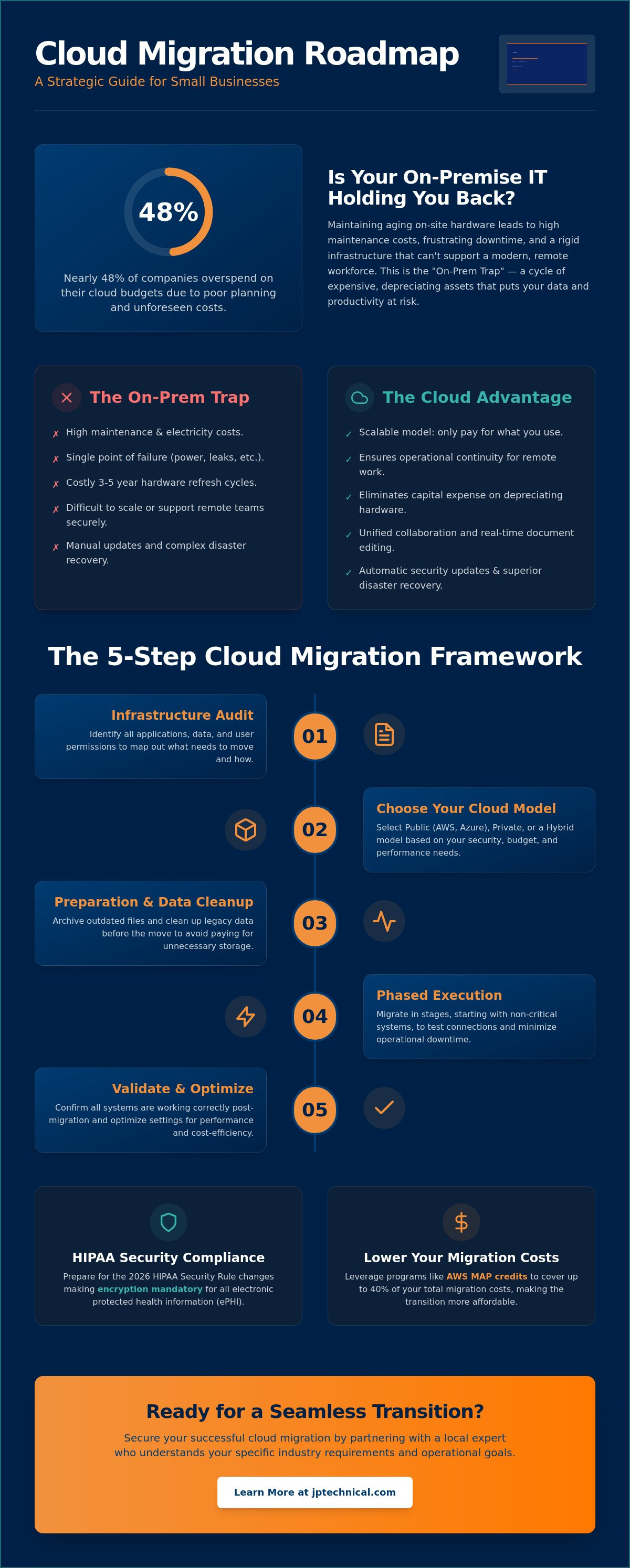
Nearly 48% of companies overspend their cloud budgets due to poor planning. If you’re currently maintaining aging on-site hardware while trying to support a remote team, you’ve likely felt the frustration of high maintenance costs and unpredictable IT hurdles. It’s understandable to feel cautious about moving your data, especially with the 2026 HIPAA Security Rule changes making encryption mandatory for all electronic protected health information. You need a transition that protects your continuity rather than threatening it.
This strategic guide teaches you how to manage cloud migration for small businesses securely and cost-effectively. We’ll show you how to lower your overhead and gain peace of mind through a phased approach that eliminates operational downtime. You’ll learn about claiming AWS MAP credits to cover up to 40% of migration costs and how to prepare for the new technical safeguard requirements coming this year. By the end, you’ll have a clear roadmap to a predictable, modern infrastructure that works as hard as you do.
Key Takeaways
Replace aging physical hardware with a scalable model that reduces IT overhead and supports your remote team.
Follow a structured framework to audit your applications and determine if a public, private, or hybrid cloud model fits your needs.
Learn how the shared responsibility model and a Business Associate Agreement protect your data and ensure HIPAA compliance.
Navigate regional connectivity and latency challenges by implementing local redundancy to keep your office online.
Secure a successful cloud migration for small businesses by partnering with a local expert who understands your specific industry requirements.
Table of Contents
Why Small Businesses are Moving to the Cloud in 2026
Cloud migration for small businesses involves moving your company’s data, applications, and IT processes from local, physical servers to remote, secure data centers. This transition is a specific type of system migration that allows you to access your tools via the internet rather than relying on a box in a closet. In 2026, this move has shifted from a luxury to a requirement for staying competitive and secure.
The “On-Prem Trap” is a reality many local business owners face. Maintaining physical servers in your office creates a rigid environment that can’t adapt to quick changes. If your server fails, your entire operation stops. Moving to the cloud provides scalability, meaning you only pay for the storage and computing power you actually use. It also ensures operational continuity. Your team can work from a home office, a medical clinic, or a job site with the same security and speed they have in the office.
The Real Cost of Staying On-Premise
Many owners look only at the sticker price of a new server, but the hidden costs are what truly drain a budget. You have to account for the electricity required to run the machines and the specialized cooling systems needed to prevent overheating. Emergency hardware repairs often come with high labor rates and even higher costs in lost productivity during the wait for parts.
A single server room represents a dangerous single point of failure. If a pipe leaks or a power surge hits, your data is at risk. We also have to consider the hardware refresh cycle. This cycle is the mandatory replacement of physical equipment every three to five years to avoid total system failure or software incompatibility. This process forces you to spend large amounts of capital on depreciating assets rather than investing in your core business growth.
Cloud Benefits Beyond Just Storage
The cloud offers more than just a place to park your files. It creates a unified environment where your team can edit documents in real time, reducing the confusion of multiple file versions. This level of collaboration is difficult to achieve with traditional on-site setups that require complex VPNs or remote desktop configurations.
Security also becomes more manageable. Cloud environments allow for automatic updates, which removes the burden of manual patch management from your daily to-do list. When it comes to disaster recovery, cloud-based systems are far superior to physical tapes or external hard drives. Your data is replicated across multiple secure locations, ensuring that even if one facility faces an issue, your business stays online. This proactive approach to cloud migration for small businesses builds a foundation of long-term stability and peace of mind.
The 5-Step Cloud Migration Framework for SMBs
Success in the cloud isn’t about moving fast. It’s about moving correctly. A successful cloud migration for small businesses follows a disciplined path to ensure your data stays safe and your team stays productive. An NSF report on cloud computing suggests that businesses see the most innovation when they align their technical shifts with specific operational goals. This framework provides that alignment.
Step 1: The Infrastructure Audit
You can’t move what you don’t understand. The first step involves a full audit of your current applications, data sets, and user permissions. You must identify which programs are “cloud-ready” and which are legacy systems that might require more attention. Mapping user access ensures that your security permissions translate correctly to the new environment. If you aren’t sure how your current tools will behave, consulting with a Virtual CIO can help align your migration with your long-term business objectives.
Step 2: Choosing Your Cloud Model
Your budget and security needs will dictate your cloud model. Public clouds like Azure or AWS offer massive scale and cost-effectiveness, while private clouds provide dedicated resources for sensitive operations. Many local firms choose a hybrid approach. This allows you to keep some sensitive data on local servers while moving your primary applications to the cloud for better access. For a medical office, a private cloud often provides the dedicated security required for patient files, while a public cloud might be more economical for general administrative tasks.
The final three steps focus on the transition itself:
Preparation: Clean up your legacy data before the move. This avoids the “garbage in, garbage out” trap where you pay to store outdated or redundant files.
Execution: Perform the move in stages. Migrating non-critical systems first allows you to test the connection without risking your daily operations.
Optimization: The work doesn’t end once the data is moved. You must monitor performance and adjust your resources. This ensures you’re only paying for the computing power you actually need.
If you feel overwhelmed by these technical choices, our managed IT services can provide the steady hand and local expertise your business deserves. Taking these steps systematically ensures your transition is a source of growth rather than a cause of stress.
Navigating Security and HIPAA Compliance in the Cloud
Security in the cloud is not a set-it-and-forget-it task. It operates on a Shared Responsibility Model. While your cloud provider secures the physical data center and the underlying hardware, you’re responsible for securing the data you put into that environment. This means managing your own user permissions, configurations, and internal access controls. Successful cloud migration for small businesses requires a deep understanding of where the provider’s duty ends and yours begins.
If your business handles sensitive information, a Business Associate Agreement (BAA) is a non-negotiable requirement. This legal document ensures that your cloud provider meets specific regulatory standards. The proposed 2026 HIPAA Security Rule changes have raised the bar for these agreements. The final rule, expected to become effective between July and August 2026, makes encryption for all electronic protected health information (ePHI) a mandatory requirement. This applies to data at rest on a server and data in transit as it moves across the internet. You no longer have the flexibility to treat encryption as an “addressable” safeguard; it’s now a hard requirement for compliance.
Cloud Security for Healthcare Providers
Local healthcare providers in Anchorage face unique challenges when aligning with federal standards. HIPAA-compliant IT support ensures your cloud environment is configured to meet these 2026 mandates. We recommend implementing Endpoint Detection and Response (EDR) alongside your cloud storage. EDR monitors your devices for suspicious behavior in real-time. Additionally, multi-factor authentication (MFA) is your first line of defense. New BAA requirements for 2026 specifically call for MFA and biannual vulnerability scans to prevent unauthorized access.
The Intersection of Physical and Digital Security
When planning cloud migration for small businesses, integrating your physical surveillance is often overlooked. Modern cloud-based surveillance systems, such as those from Axis, are replacing outdated local DVRs. These systems allow you to manage cameras and physical access controls through a single cloud dashboard. This unified defense posture means you can monitor your office entrance from any location while ensuring the footage is stored securely in the cloud. Linking your IT support with your physical security creates a seamless protective layer. If a security breach occurs at your front door, your digital systems can alert you immediately; providing a level of vigilance that local hardware simply cannot match.
Overcoming Alaska-Specific Migration Challenges
Successful cloud migration for small businesses in Alaska requires more than just a fast internet connection. Our state’s unique geography and ISP landscape create specific hurdles that national providers often fail to address. Latency, or the delay in data transmission, can turn a high-speed cloud application into a source of frustration if your network isn’t optimized for the distance your data must travel. We focus on building a stable foundation so your transition doesn’t stall due to regional connectivity issues.
Redundancy is the cornerstone of a cloud-reliant office. If your primary internet connection fails, your access to critical business data vanishes instantly. We solve this by implementing secondary connections and ensuring your data sovereignty. This means your information stays within US-based data centers, keeping you compliant with federal regulations and avoiding the risks associated with international data storage. This level of protective vigilance ensures your operations remain predictable even when the unexpected happens.
Internet Reliability in Anchorage and Beyond
We evaluate local ISPs for cloud readiness across Wasilla, Kenai, and Fairbanks. Not every provider offers the stability needed for real-time cloud environments. To manage this, we often implement SD-WAN technology. This allows your office to prioritize essential cloud traffic over non-essential guest Wi-Fi usage, ensuring your team has the bandwidth they need. Local onsite IT support Anchorage is a safety net for cloud users. If a hardware issue occurs at the network level, having a technician who can physically arrive at your location is the only way to ensure a quick resolution.
The Value of a Local IT Partner
Many businesses fall into the “1-800-Number” trap. When a migration issue arises, they spend hours on hold with a technician who has never seen their office and doesn’t understand the local infrastructure. We believe in a neighborly approach that prioritizes direct communication. A cloud issue sometimes requires a physical hand in your office to troubleshoot local hardware or cabling. You need a guide who shows up when things get difficult.
JP Technical provides predictive peace of mind for local SMBs by monitoring your systems in the background. We handle the technical mastery of your environment so you can focus on your clients. If you’re ready to move forward with a partner who values local accountability, our managed IT services in Anchorage provide the steady, reliable support your business requires to thrive in the cloud.
Choosing Your Partner for a Seamless Transition
Selecting the right guide for your cloud migration for small businesses is the single most important decision in this process. Technology is a tool, but the expertise behind it determines if that tool builds your business or creates new headaches. You should look for a partner with deep roots in your specific industry. Whether you manage a dental clinic, a medical practice, or a legal office, your data handling requirements are unique. A partner who understands these nuances ensures your workflows remain uninterrupted during the move.
Security expertise is non-negotiable. If you handle sensitive patient or client data, your partner must have a proven track record with HIPAA compliance services. With the mandatory encryption requirements taking effect in late 2026, you need a specialist who can verify that every data point meets federal standards. Additionally, demand transparent, flat-rate pricing. Many businesses experience “cloud bill shock” when they receive their first invoice. A reliable partner provides predictable monthly billing that aligns with your budget, eliminating the anxiety of fluctuating IT costs.
The JP Technical Approach to Cloud Migration
We operate on a philosophy of steady reliability. This means we move at a pace that protects your daily operations rather than rushing into a “big bang” migration that causes downtime. We act as a single point of contact for your managed IT and physical security. If a camera goes offline or a cloud application lags, you only have one local team to call. We handle the heavy technical lifting and background maintenance. This allows you to focus on your clients and core business goals while we maintain a watchful eye on your infrastructure.
Next Steps: Your Cloud Readiness Assessment
The journey begins with a thorough consultation with our Anchorage-based team. We don’t believe in one-size-fits-all solutions. During this initial meeting, we’ll audit your current environment and identify any potential roadblocks. We then develop a long-term roadmap that prioritizes your technology’s stability and future growth. This plan ensures your infrastructure is ready for the demands of the modern landscape. If you’re ready to secure your business’s future, you can Schedule your Cloud Readiness Assessment with JP Technical today. We’re here to provide the local accountability and professional vigilance you deserve.
Securing Your Path to a Modern Infrastructure
Transitioning to the cloud is a significant step toward long-term stability and operational freedom. By following a structured framework, you can move away from the high costs of aging hardware while ensuring your team remains connected from anywhere. It’s about more than just data storage; it’s about building a resilient environment that meets the 2026 HIPAA standards for mandatory encryption and protects your business from unpredictable downtime.
Successfully managing cloud migration for small businesses requires a local partner who understands the unique connectivity landscape of Alaska. Since 1996, we’ve served businesses in Anchorage, Wasilla, and Fairbanks with a focus on steady reliability and protective vigilance. We provide integrated physical and digital security solutions that protect your entire office, ensuring your transition is handled with technical mastery and neighborly care.
You don’t have to handle these technical hurdles alone. Our HIPAA-compliant IT experts are ready to act as your seasoned guide through every phase of the transition. Secure Your Business Future with Expert Cloud Services and gain the peace of mind that comes with a professional partnership. We look forward to helping your business thrive in a more predictable, secure environment.
Frequently Asked Questions
Is cloud migration safe for a small business with sensitive client data?
Yes, cloud migration is safe when implemented with professional oversight and protective vigilance. Modern cloud data centers typically offer higher security standards than local server closets. We ensure your sensitive information is protected by mandatory encryption and multi-factor authentication, which helps you stay ahead of the 2026 HIPAA Security Rule updates.
How long does a typical cloud migration take for an SMB?
A typical transition can take anywhere from a few weeks to several months. The timeline depends on the volume of your data and the complexity of your current software. We use a methodical, phased approach to ensure each stage is stable before moving to the next, which prevents rushing and minimizes risk.
Will my business experience downtime during the migration process?
Your business won’t experience significant downtime if the migration is planned correctly. We perform the technical heavy lifting in stages, often during low-traffic periods or after hours. This steady pace allows your team to remain productive while we move your systems to the new environment in the background.
What happens to my cloud data if the internet goes out in my office?
Your data remains secure and accessible from any other location with a connection, such as a home office or a mobile hotspot. To maintain continuity in your main office, we recommend a backup internet connection. This redundancy ensures your Anchorage or Wasilla team stays online even if your primary ISP fails.
Can I move my legacy software to the cloud or do I need new apps?
You can often move legacy software to the cloud using a private cloud model or specialized hosting. However, some older programs may require updates to function efficiently in a remote environment. We audit your current tools first to determine if a “lift-and-shift” or a software update is the most reliable path for your operations.
How much does cloud migration cost for a small business in Anchorage?
The cost of cloud migration for small businesses varies based on your user count, data volume, and regulatory requirements. We focus on providing transparent, flat-rate pricing to ensure your IT costs remain predictable. This approach eliminates the “bill shock” that often happens when businesses attempt to migrate without a clear financial roadmap.
What is the difference between cloud storage and a full cloud migration?
Cloud storage is simply a digital space to park files, like an online filing cabinet. A full cloud migration is a more comprehensive transition of your entire IT ecosystem, including your applications, security permissions, and workflows. This creates a unified environment that supports seamless remote work and better data protection.
Do I still need a local server if I move everything to the cloud?
Many businesses find they can completely eliminate their on-site server after a successful migration. However, some offices choose a hybrid model that keeps a small local presence for specific high-bandwidth tasks. We’ll help you evaluate your daily needs to decide if a total cloud move or a hybrid approach provides the best long-term stability.
 Article by
Colter Hobbs