Ransomware Protection for Businesses in 2026: Debunking the Myths of Cyber Defense
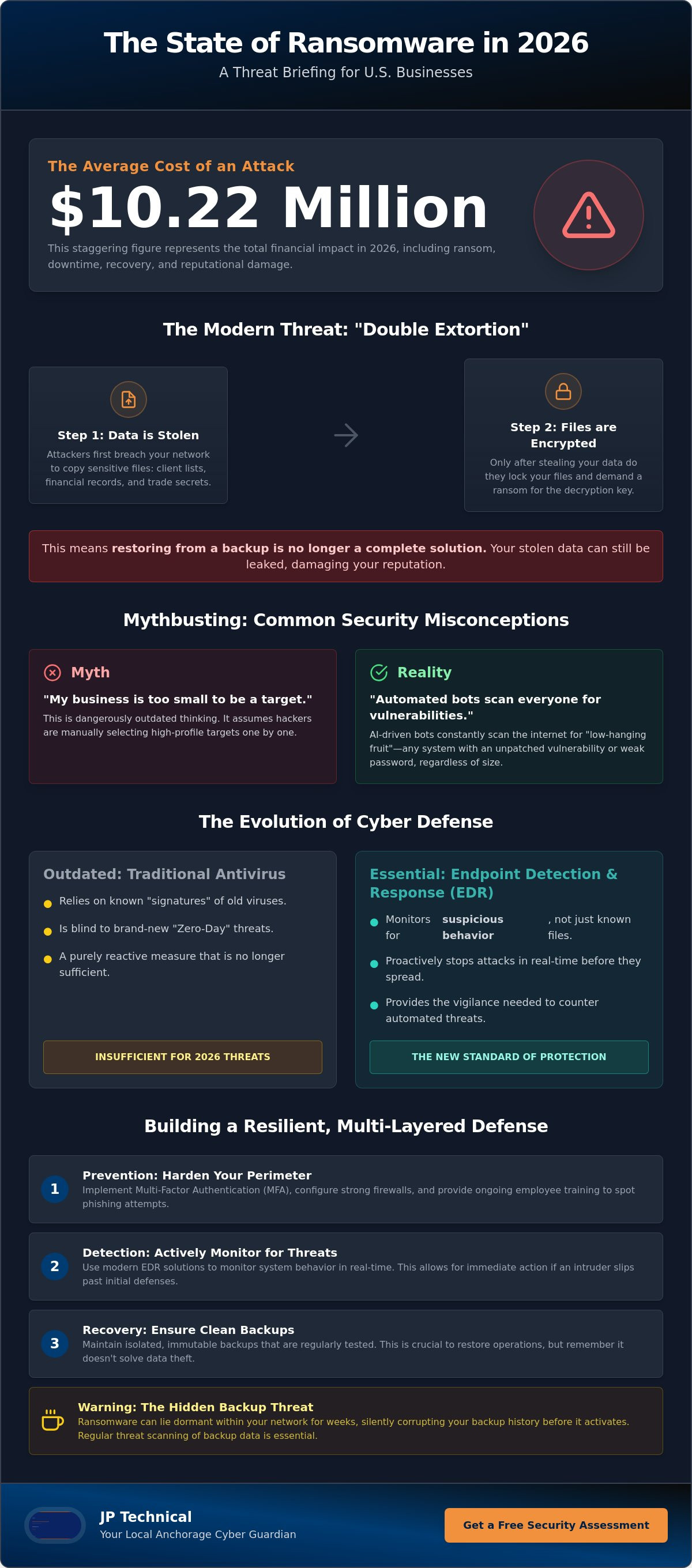
In 2026, the average total cost of a ransomware attack in the United States has climbed to a staggering $10.22 million. If you’re relying on basic antivirus software as your primary ransomware protection for businesses, you’re essentially leaving your front door unlocked during a storm. It’s a heavy burden for any local owner to carry; especially when you’re already juggling limited staff and a tight budget. You’ve likely heard that hackers only target the giants, but the reality is that smaller organizations are now the primary targets for automated, AI-driven threats.
It is perfectly normal to feel frustrated by complex security terminology and the fear of losing everything to a single click. We understand that you need clear answers, not more confusion. This article will help you look past the myths of cyber defense to see what actually works. You will discover how to build a resilient, multi-layered strategy that accounts for the unique challenges of the Alaskan landscape. We’ll provide a prioritized list of security investments so you can protect your livelihood and finally enjoy the peace of mind that comes from having a local expert watching your back.
Key Takeaways
Understand how the shift to “double extortion” means that simply restoring files is no longer enough to protect your business reputation.
Learn why automated attack bots target small offices regardless of size, making proactive ransomware protection for businesses a necessity rather than an option.
Identify the hidden flaws in standard cloud backups and how dormant threats can compromise your entire recovery history.
Discover a prioritized, multi-layered defense strategy that combines Multi-Factor Authentication with active behavior monitoring.
See how a local, flat-rate partnership provides the protective vigilance needed to handle complex technical threats quietly in the background.
Table of Contents
What is Ransomware Protection for Businesses in 2026?
In 2026, ransomware is no longer just a technical glitch or a nuisance virus. It has matured into a sophisticated extortion economy that operates with the efficiency of a global corporation. To understand the gravity of the situation, it helps to review the history of What is Ransomware? and see how it has evolved from basic locking mechanisms into a multi-billion dollar criminal enterprise.
Modern attackers now rely on “double extortion.” They don’t simply encrypt your files and wait for a payment; they steal sensitive data first. If you refuse to pay for the decryption key, they threaten to leak your client information, payroll records, or trade secrets on the public web. This shift means that having a backup is no longer a guaranteed escape route. You need a strategy that prevents the theft from happening in the first place.
The 2026 landscape is also defined by relentless speed. Hackers use AI-powered phishing tools to create perfect, personalized emails that trick even the most cautious employees. Simultaneously, automated vulnerability scanning runs 24/7. These bots search for any unpatched software or open ports in your network. Because of this, effective ransomware protection for businesses must be a three-part strategy. It requires prevention to stop the entry, detection to catch intruders who slip through, and rapid recovery to restore operations if a breach occurs.
The Evolution of Ransomware-as-a-Service (RaaS)
Cybercrime has become professionalized through a model known as Ransomware-as-a-Service. RaaS is a subscription model for cybercrime where specialized developers rent their attack tools to “affiliates” for a cut of the ransom profit. This change has lowered the barrier to entry significantly. You don’t need to be a master coder to be a cybercriminal anymore. Now, a low-skill attacker anywhere in the world can launch a sophisticated campaign against an Anchorage medical office or a Fairbanks retail shop. They simply buy the kit and start scanning for targets.
Why Traditional Antivirus is No Longer Sufficient
Old-school antivirus relies on “signatures,” which are essentially digital fingerprints of known threats. This method only works if the virus has been seen and cataloged before. Today, “Zero Day” threats use brand-new code that bypasses these lists entirely. If the software doesn’t recognize the fingerprint, it lets the threat inside.
Modern ransomware protection for businesses requires behavior-based detection. Instead of looking for a specific file name, we look for suspicious actions. If a program suddenly starts encrypting thousands of files at once, the system flags it and stops the process. This proactive approach is part of Endpoint Detection and Response (EDR). EDR is the new standard because it monitors your systems in real-time, providing the vigilance needed to stop an attack before it spreads through your entire network.
Myth-Busting: “My Business is Too Small to Target”
Many business owners in Anchorage believe their size acts as a natural shield. They assume that because they aren’t a multinational bank, they aren’t worth a hacker’s time. This is the “security through obscurity” myth, and it’s dangerous. Modern cybercrime is rarely personal. It’s automated. If you have an internet connection, you’re on the map.
Digital attack bots don’t look for company names or high-profile logos. They scan IP addresses looking for specific technical vulnerabilities. If your network has an unpatched firewall or a weak password, you become a target by default. For these bots, ransomware protection for businesses is a binary check: either you’re secure, or you’re an easy payday. They don’t care if you have five employees or five thousand.
Hackers also use small businesses as stepping stones. If you provide services to a larger corporation or a government agency, you are part of a supply chain. Attackers might breach your smaller, less-guarded network to gain the credentials needed to infiltrate their primary target. This makes every local vendor a potential entry point for larger campaigns. If you’re concerned about your current risk level, our team at JP Technical can help evaluate your existing safeguards and close those gaps.
The “Low Hanging Fruit” Reality
Automated scanners don’t stop at the Anchorage city limits. They are constantly probing networks in Wasilla, Kenai, and across the state. Because small offices often lack dedicated IT staff, they’re viewed as “low hanging fruit.” The effort required to breach a small business is minimal, making the attack highly profitable even for smaller ransom demands. According to the National Cyber Security Alliance, 60% of small businesses that suffer a major data breach close their doors within six months. The cost of downtime alone can be fatal for a company without massive cash reserves.
The Hidden Value of Your Business Data
You might think your data isn’t valuable to anyone else. However, your data is priceless to you. Attackers know that if your operations stop, your revenue stops. They aren’t just selling your files; they’re selling you back your ability to work. Beyond operational uptime, your customer records contain Personally Identifiable Information (PII) that fetches a high price on the dark web. For local dental or medical clinics, a breach isn’t just a technical issue; it’s a HIPAA violation that carries heavy legal penalties. Following the recommendations in CISA’s StopRansomware Guide is a great first step toward securing these vital assets and ensuring your clinic stays compliant.
Why Your Current Backup Strategy Might Fail
Many business owners believe that having a cloud drive means they are safe. “I have my files in the cloud, so I can just restore them if anything happens,” is a common sentiment. Unfortunately, this is a dangerous myth. In 2026, relying on a simple sync service as your primary ransomware protection for businesses is no longer enough. Modern ransomware is designed to be “backup-aware.” It often sits dormant on your network for weeks, quietly infecting every new backup cycle before it finally triggers the encryption. If you don’t catch the threat early, your backups become as useless as the original files.
To fight this, you need Immutable Backups. This is data that cannot be changed, overwritten, or deleted by anyone, including a systems administrator. If a hacker gains full control of your network, they still cannot touch the immutable copies. We recommend following the 3-2-1-1 rule for maximum resilience. This involves keeping three copies of your data on two different types of media, with one copy stored offsite and one copy stored in an immutable or offline state. For more resources on setting up these protocols, the U.S. Government’s StopRansomware.gov provides excellent guidance on disaster recovery standards.
The Danger of Synchronized Cloud Storage
Services like Dropbox or OneDrive are great for collaboration, but they are not true backups. These tools are designed to sync changes instantly. If ransomware encrypts a file on your laptop, the cloud service sees that “change” and immediately updates the cloud version. Within seconds, your backup is also encrypted. You must distinguish between “syncing” and “versioned, air-gapped backups.” An air-gapped backup is a copy of your data that is completely disconnected from your network. This physical or logical separation ensures that even if your entire office is compromised, your recovery data remains safe and untouched.
Testing Your Disaster Recovery Plan
A backup is only as good as your ability to restore it. Many companies discover too late that their restore process takes days or even weeks. This is why we focus on two critical metrics: Recovery Time Objective (RTO) and Recovery Point Objective (RPO). RTO is the amount of time your business can afford to be down. RPO is the amount of data you can afford to lose. We encourage every local business to run a “Fire Drill” for their data. Testing your restore process under pressure ensures that when a real crisis hits, you can get back to work quickly without the panic of the unknown.
Building a Layered Defense for Alaska Businesses
Effective ransomware protection for businesses isn’t a single software purchase. It’s a series of interlocking shields. When one layer is challenged, the next stands ready to catch the threat. This “defense-in-depth” strategy ensures that a single mistake by an employee or a single unpatched device doesn’t lead to a total system collapse. For Alaskan business owners, this approach is the only way to maintain steady operations in an increasingly automated threat environment.
To build a resilient defense, we recommend a five-step framework:
Step 1: Multi-Factor Authentication (MFA). Require a second form of verification for every login. This simple step blocks the vast majority of automated credential attacks.
Step 2: Managed EDR. Deploy Endpoint Detection and Response for 24/7 behavior monitoring. Unlike basic antivirus, EDR catches the “Zero Day” threats we discussed earlier by identifying suspicious patterns in real-time.
Step 3: Patch Management. Establish a strict schedule to update all hardware and software. Automated bots look for the “low-hanging fruit” of old, unpatched vulnerabilities.
Step 4: Employee Awareness Training. Your team is your first line of defense. Regular training helps them spot AI-driven phishing attempts before they click a malicious link.
Step 5: Physical Perimeter Security. Protect the hardware itself. An unsecured server room is an open invitation for local, physical network injections.
If you’re ready to harden your local network and ensure your team is prepared, contact the experts at JP Technical to start building your customized defense strategy.
The Physical Security Link
Digital security often fails because of physical oversights. An unsecured server room or a guest Wi-Fi password written on a lobby chalkboard can provide the entry point a hacker needs. Once a physical device is compromised, digital encryption can spread through your network in minutes. Utilizing commercial surveillance systems Anchorage businesses trust acts as a vital deterrent. These systems allow you to monitor who has access to your sensitive hardware, closing the gap between your physical and digital worlds.
HIPAA and Regulatory Compliance Layers
For healthcare providers in Alaska, ransomware protection for businesses is also a legal requirement. HIPAA mandates strict data encryption and audit-ready logs for all access to patient information. Managed IT services ensure that these logs are maintained automatically, taking the burden of proof off your staff. We also emphasize the importance of Business Associate Agreements (BAA). These documents ensure that every partner handling your data is held to the same high security standards, protecting you from third-party liability during a breach.
The JP Technical Approach: Your Local Anchorage Guardian
Choosing a partner for ransomware protection for businesses is a decision that impacts your long-term stability. Many national providers offer “800-number” support where you’re just another ticket in a global queue. We take a different path. At JP Technical, we operate as your local guardian. Our technicians live and work in the same community you do. When a crisis hits, you don’t need a distant voice on the phone. You need a seasoned professional who understands your specific operational environment and values human connection over automated scripts.
Our flat-rate Managed IT Services model is designed with your security in mind. In a traditional “break-fix” relationship, the provider only makes money when your systems fail. We’ve flipped that incentive. Under our model, our success is tied directly to your uptime. If your network is secure and running smoothly, we’ve done our job. This creates a natural partnership where we are constantly looking for ways to improve your vigilance and stop threats before the “lock” screen ever appears.
We provide a 360-degree defense by integrating IT support with physical security. As we discussed in the previous section, a digital breach often begins with a physical vulnerability. By managing both your network and your surveillance systems, we close the loops that distant vendors often ignore. This comprehensive approach ensures that your business is protected from the server room to the cloud.
Why Local Matters During a Cyber Crisis
If a server fails or a physical breach occurs in Wasilla or Palmer, you can’t wait for a technician to fly in from the Lower 48. Having “boots on the ground” means we can respond to hardware emergencies in person. We understand the local business climate and the unique challenges of operating in Alaska. We invite you to a Security Health Check to identify any current gaps in your strategy. It’s a straightforward way to see where you stand without the pressure of a sales pitch.
Comprehensive Peace of Mind
Our goal is to provide the predictability you need to focus on your core business. From Managed EDR and Patch Management to Physical Access Controls and Backup & Disaster Recovery, we handle the technical mastery in the background. We are the reliable neighbor who happens to be a specialist. You get the sophistication of a high-level security firm with the no-nonsense work ethic of a local partner. Take the first step toward a more secure future today. Protect your business with a local cybersecurity audit and gain the peace of mind that comes from having a dedicated ally on your side.
Secure Your Business for the Years Ahead
Effective ransomware protection for businesses requires more than just a cloud backup or a basic antivirus. True resilience comes from a multi-layered strategy that addresses both digital vulnerabilities and physical entry points. By shifting from a reactive mindset to one of proactive vigilance, you protect your data, your reputation, and your daily operations from the sophisticated extortion economy of 2026.
Since 1996, we’ve served as HIPAA-compliant security specialists for the Alaskan community. We bridge the gap between IT and surveillance to provide integrated solutions that distant vendors simply can’t match. Our team understands the local landscape and possesses the technical mastery to handle threats quietly in the background, allowing you to stay focused on your goals. We invite you to take the next step in hardening your defenses today.
Secure Your Anchorage Business with a Comprehensive Cyber Audit
You don’t have to face these complex technical hurdles alone. With a reliable local guardian watching your back, you can move forward with the peace of mind you deserve.
Frequently Asked Questions
Is ransomware protection the same as antivirus software?
No, standard antivirus is only one component of a modern defense strategy. While antivirus looks for known file signatures, comprehensive ransomware protection for businesses includes behavior monitoring, air-gapped backups, and employee training. Modern threats often use brand-new code that traditional antivirus cannot recognize. You need a proactive system that identifies suspicious actions, such as mass file encryption, rather than just matching a list of old viruses.
How much does ransomware protection typically cost for a small business?
Costs vary based on your organization’s size, the number of devices, and the complexity of your network. Industry data suggests that small businesses should allocate 3-5% of their annual revenue to cybersecurity to maintain a resilient defense. Instead of looking at it as a single purchase, consider it a monthly investment in operational continuity. A customized plan ensures you aren’t paying for unnecessary tools while still covering your most critical vulnerabilities.
Can hackers bypass Multi-Factor Authentication (MFA)?
Yes, hackers can bypass MFA through sophisticated methods like session hijacking or MFA fatigue attacks, but it remains a vital defense. MFA is known to block 99.9% of automated cyberattacks by requiring a second form of verification. While it isn’t a silver bullet, it creates a massive hurdle that most automated bots cannot clear. It should always be used alongside other layers like managed EDR and regular user training.
What is the first thing I should do if I think my business is being attacked?
You should immediately disconnect the affected computer or server from the network to stop the infection from spreading. Pull the Ethernet cable or disable the Wi-Fi; don’t simply turn the machine off, as some ransomware can continue its work during the shutdown process. Once the device is isolated, contact your IT partner to begin the incident response protocol. Quick action can be the difference between losing one workstation and losing your entire database.
How does physical security help prevent a ransomware attack?
Physical security prevents unauthorized individuals from gaining direct access to your servers, routers, or workstations. A visitor plugging a malicious USB drive into an unattended computer can bypass digital firewalls entirely. By using professional surveillance and access controls, you ensure that only authorized staff can interact with the hardware. This “boots on the ground” defense is a critical but often overlooked part of a 360-degree security strategy.
Does cyber insurance cover the cost of a ransomware payment?
Whether your policy covers a ransom payment depends on your specific terms and evolving legal regulations. Many modern policies cover the costs of forensic investigations, data recovery, and legal fees, but some insurers are moving away from direct ransom payouts. It is important to review your coverage with your agent. Most insurers now require proof of proactive measures, like MFA and encrypted backups, before they will issue or renew a policy.
How often should my business test its data backup systems?
You should perform a full restore test at least once every quarter to ensure your data is actually recoverable. A backup that hasn’t been tested is merely a hope, not a strategy. Regular fire drills help you identify exactly how long it takes to get back online, which is your Recovery Time Objective. Monthly testing is even better for businesses with high data turnover or those operating under strict regulatory compliance needs.
Is my Alaska-based medical practice legally required to have specific ransomware protections?
Yes, your practice must comply with HIPAA’s Security Rule, which mandates administrative, physical, and technical safeguards for electronic protected health information. Additionally, the Alaska Personal Information Protection Act requires businesses to notify individuals of data breaches. Implementing robust ransomware protection for businesses in the healthcare sector is a legal necessity to avoid heavy fines and ensure your patient data remains confidential and accessible at all times.
 Article by
Colter Hobbs